

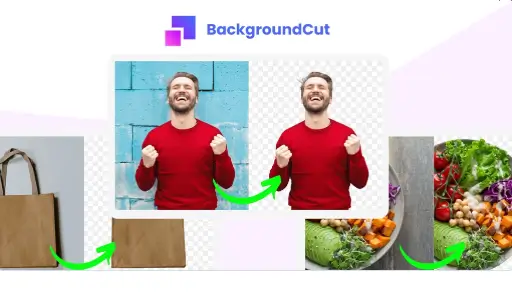
Removing backgrounds from photos can be tedious and time-consuming. BackgroundCut makes it quick and easy.
BackgroundCut is a powerful AI tool designed to remove or replace image backgrounds in seconds. This tool leverages advanced machine learning to simplify photo editing tasks. With just one click, users can eliminate backgrounds from high-resolution images, saving valuable time. Whether you are a solopreneur or a small business owner, BackgroundCut offers a cost-effective solution for your graphic design needs. The tool includes unlimited high-resolution removals, 10 monthly API credits with rollover, and lifetime access for a one-time payment of $59. Additionally, a 60-day money-back guarantee ensures a risk-free trial. Discover more about BackgroundCut’s pricing and features here.
Introduction To Backgroundcut And Its Purpose
Removing backgrounds from photos can be a tedious and time-consuming task. BackgroundCut simplifies this process, offering a fast and efficient solution. This AI-powered tool helps users remove or replace the background of any image in just seconds, saving valuable time and effort.
What Is Backgroundcut?
BackgroundCut is an AI-powered tool designed for quick and easy background removal. It leverages artificial intelligence and machine learning to analyze and cut out an image’s background with a single click. This reduces the time and effort required for photo editing tasks.
| Feature | Description |
|---|---|
| AI and Machine Learning | Utilizes advanced algorithms to remove backgrounds in under 5 seconds. |
| Ease of Use | Simple interface requiring just one click to remove or replace backgrounds. |
| High-Resolution Support | Handles images up to 25 megapixels. |
| Unlimited Removals | Unlimited high-resolution background removals. |
| API Credits | Includes 10 API credits per month with unlimited rollover. |
| Lifetime Access | Single purchase provides lifetime access to the tool. |
| Future Updates | Free access to all future feature releases and updates. |
| Planned Enhancements | Upcoming features include support for logos, clipart, vector graphics, and various integrations (e.g., Chrome plugin, Zapier). |
The Need For Background Removal Tools
Editing images manually can be time-consuming and challenging. Background removal tools like BackgroundCut simplify this process. They help users achieve professional-quality results with minimal effort. This is essential for anyone looking to enhance their photos quickly and efficiently.
- Reduce time spent on editing.
- Achieve professional-quality results.
- Streamline the photo editing process.
Who Can Benefit From Using Backgroundcut?
Many people can benefit from using BackgroundCut. This includes solopreneurs, small business owners, and anyone engaged in graphic design projects. It is also ideal for those who need to edit images frequently and efficiently.
- Solopreneurs – Save time and enhance productivity.
- Small Business Owners – Achieve professional-quality images without hiring experts.
- Graphic Designers – Streamline editing tasks and focus on creativity.
BackgroundCut offers a cost-effective solution. The one-time payment of $59 provides lifetime access. Users enjoy unlimited high-resolution background removals, 10 monthly API credits with rollover, and access to all future feature updates.
Key Features Of Backgroundcut
BackgroundCut is a powerful tool designed to make removing image backgrounds fast and simple. Let’s explore the key features that make BackgroundCut stand out in the market.
Ai-powered Background Removal
BackgroundCut leverages artificial intelligence and machine learning to remove backgrounds from images in under five seconds. This advanced algorithm ensures high accuracy and precision, making the editing process efficient and effortless.
User-friendly Interface
The tool features a simple interface that requires just one click to remove or replace backgrounds. Even users with no technical expertise can navigate and use BackgroundCut with ease.
Batch Processing Capabilities
BackgroundCut supports batch processing, allowing users to edit multiple images simultaneously. This feature is particularly useful for businesses and individuals who need to process large volumes of images quickly.
High-resolution Output
Users can expect high-resolution support with BackgroundCut, as it handles images up to 25 megapixels. This ensures that the final output is of professional quality and suitable for various applications.
Integration With Other Tools
BackgroundCut is set to include various integrations such as Chrome plugin and Zapier. These integrations will enhance the tool’s functionality and streamline the workflow for users who rely on multiple software solutions.
Pricing And Affordability Breakdown
Understanding the pricing structure of BackgroundCut is crucial for making an informed decision. This section breaks down the different pricing plans and their affordability. From free options to enterprise solutions, we cover it all.
Free Vs Paid Plans
BackgroundCut offers a straightforward pricing model. There is no free plan available, but the one-time payment of $59 provides lifetime access to the tool. This includes:
- Unlimited high-resolution background removals
- 10 monthly API credits with unlimited rollover
- Access to all future feature updates
Monthly Subscription Options
Unlike other tools, BackgroundCut does not offer a monthly subscription option. The focus is on a one-time payment model which ensures lifetime access and continuous updates without recurring costs.
Annual Subscription Discounts
There are no annual subscription plans or discounts available. The one-time payment of $59 covers all features and updates for a lifetime.
Enterprise Pricing
For businesses needing extensive use, BackgroundCut does not have a separate enterprise pricing model. The same lifetime access at $59 applies. This includes unlimited high-resolution background removals and API credits, making it a cost-effective solution for enterprises as well.
| Plan | Price | Features |
|---|---|---|
| Lifetime Access | $59 |
|
With its simple pricing structure, BackgroundCut provides great value for both individuals and businesses.
Pros And Cons Of Using Backgroundcut
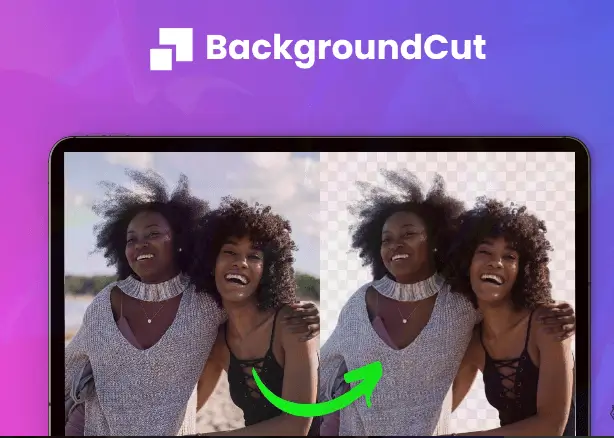
BackgroundCut offers a simple and quick way to remove backgrounds from images. While it has many advantages, there are also some limitations to consider. Below are the pros and cons of using BackgroundCut.
Pros: Efficiency And Accuracy
BackgroundCut excels in efficiency and accuracy. The tool uses advanced AI and machine learning algorithms to remove backgrounds in under 5 seconds. This rapid processing saves users significant time and effort compared to manual editing. The accuracy of BackgroundCut ensures professional results, even for high-resolution images up to 25 megapixels.
Pros: Cost-effectiveness
With BackgroundCut, users benefit from a one-time payment of $59 for lifetime access. This eliminates ongoing subscription costs, making it a cost-effective solution. The package includes unlimited high-resolution background removals, 10 monthly API credits with rollover, and access to all future feature updates. This pricing model provides excellent value for money.
Cons: Limitations In Complex Backgrounds
Although BackgroundCut is highly efficient, it may face challenges with complex backgrounds. Intricate details or overlapping elements can sometimes result in less precise cuts. Users may need to manually adjust the results for such images. This limitation is worth considering for those frequently working with complex backgrounds.
Cons: Dependency On Internet Connection
BackgroundCut requires an internet connection to function. This dependency can be a drawback for users in areas with unreliable internet access. Without a stable connection, the tool cannot perform the background removal process, potentially hindering workflow.
Ideal Users And Scenarios For Backgroundcut
BackgroundCut is a versatile tool perfect for various professionals and scenarios. Its AI-driven technology makes background removal effortless and efficient. Let’s explore the ideal users and common scenarios where BackgroundCut truly shines.
E-commerce Sellers
E-commerce sellers need high-quality product images to attract customers. BackgroundCut helps by providing:
- Quick background removal for product photos
- High-resolution support for detailed images
- Time-saving features to streamline listing processes
With just one click, sellers can ensure their products stand out, enhancing their online storefronts.
Marketing Professionals
Marketing professionals often work with various visual content. BackgroundCut offers:
- Unlimited high-resolution background removals
- Ease of use with a simple, intuitive interface
- API credits for seamless integration with marketing tools
This tool enhances marketing materials, making campaigns visually appealing and professional.
Graphic Designers And Photographers
Graphic designers and photographers demand precision and quality. BackgroundCut provides:
- Support for images up to 25 megapixels
- One-click background removal for quick edits
- Lifetime access with future updates for continuous improvement
These features ensure that designers and photographers can maintain high standards in their work.
Social Media Influencers And Content Creators
Influencers and content creators need eye-catching visuals. BackgroundCut offers:
- Easy-to-use tools for creating engaging content
- High-quality background removals for professional-looking posts
- Cost-effective solution with a one-time payment
With BackgroundCut, influencers can quickly enhance their visuals, helping them stand out on social media platforms.

Credit: prototypr.io
Frequently Asked Questions
What Are The Backgroundcut Pricing Plans?
Backgroundcut offers various pricing plans to suit different needs. They provide monthly and annual subscription options. Pricing starts from basic to professional packages.
Is There A Free Trial For Backgroundcut?
Yes, Backgroundcut offers a free trial. This allows users to test the service before committing to a paid plan.
How Much Does The Basic Plan Cost?
The Basic Plan costs $9. 99 per month. It includes essential features for occasional users.
Are There Any Discounts For Annual Subscriptions?
Yes, Backgroundcut offers discounts for annual subscriptions. You can save up to 20% by choosing an annual plan.
Conclusion
BackgroundCut offers a simple, cost-effective way to handle image backgrounds. It saves time, ensures high quality, and is easy to use. For a one-time payment, you get lifetime access and ongoing updates. The tool suits solopreneurs and small business owners alike. Try BackgroundCut risk-free with the 60-day money-back guarantee. Click here to explore more about BackgroundCut.
