

Creating scheduling software may seem complex at first. But it’s easier than you think.
This guide will break down the process for you. Scheduling software helps businesses manage appointments, tasks, and resources. It can save time, reduce errors, and improve efficiency. Whether for personal use or a large company, a good scheduling tool is essential.
In this blog post, we’ll explore the steps to create your own scheduling software. You’ll learn about key features, required skills, and tools needed. The aim is to make the process clear and straightforward. By the end, you’ll have the knowledge to start building your own scheduling solution. Ready to dive in? Let’s get started!
Introduction To Scheduling Software
Scheduling software is a tool designed to automate and streamline the planning of tasks, appointments, and events. It helps businesses and individuals manage their time efficiently. Creating your own scheduling software can be a rewarding project. This guide will introduce you to the basics.
Importance And Benefits
Effective scheduling software saves time. It reduces the need for manual planning. This software minimizes errors and double-bookings. It improves productivity by keeping tasks organized. Users can access their schedules from anywhere. This flexibility is vital in today’s fast-paced world. It also enhances communication within teams. Everyone stays on the same page.
Key Features
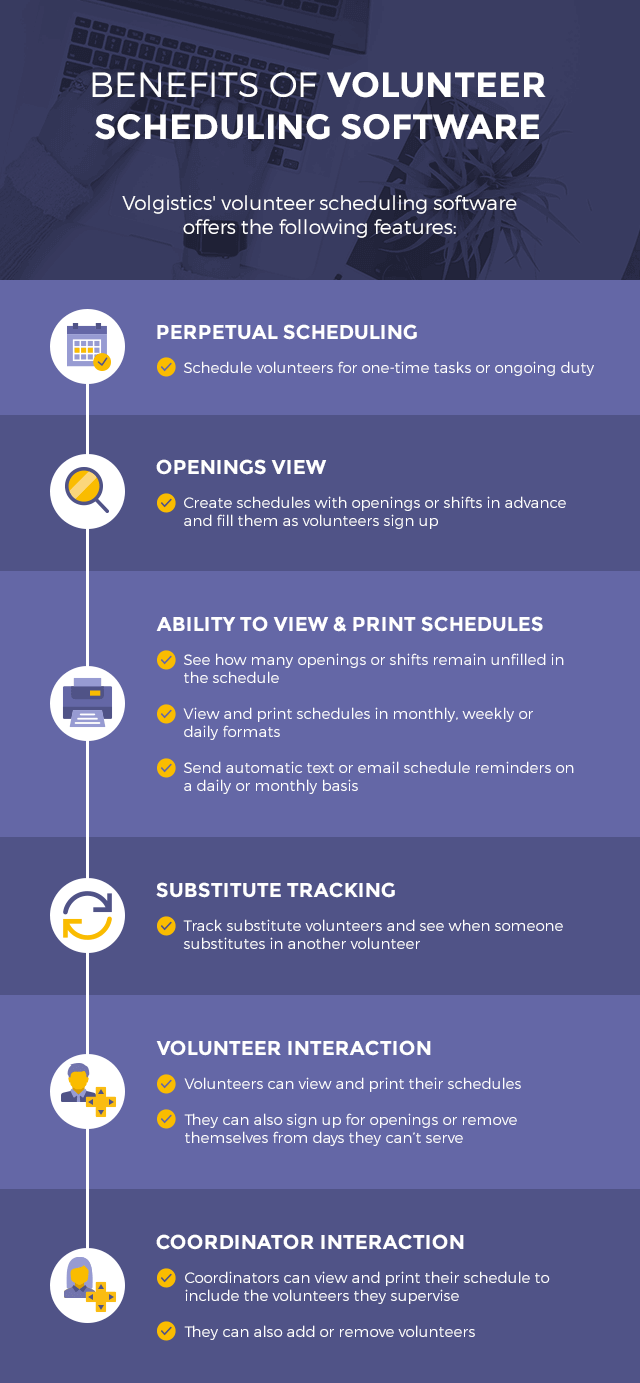
A good scheduling software needs some essential features. It should have an easy-to-use interface. Users should find it simple to add, edit, and delete events. The software must include calendar views. These views help in visualizing schedules. Alerts and reminders are crucial. They ensure no appointment is missed. Integration with other tools, like email and messaging apps, is also important. Finally, it should offer customization options. Users should tailor it to their specific needs.
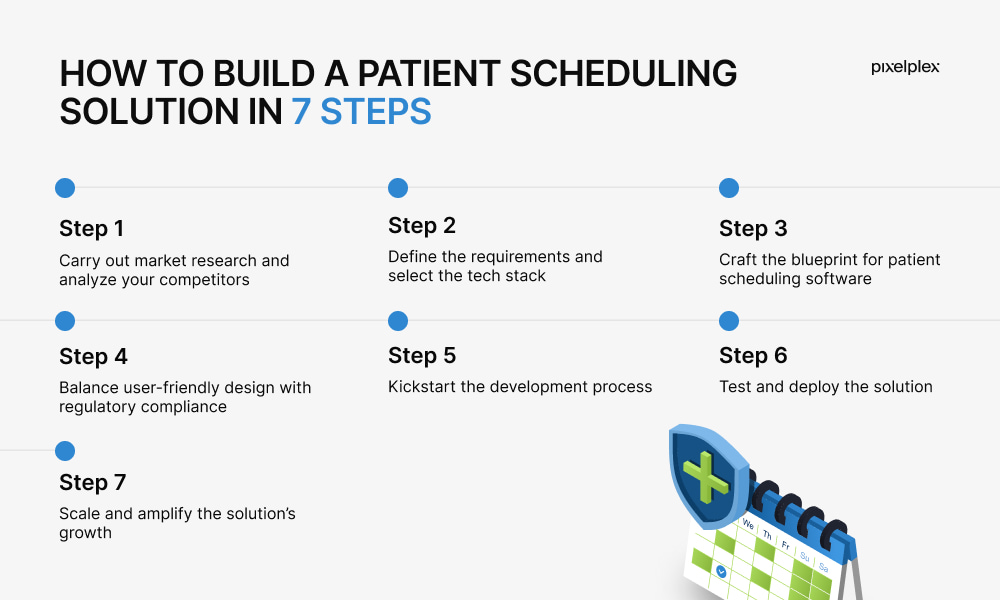
Credit: pixelplex.io
Market Research
Market research is a crucial step in creating effective scheduling software. It helps you understand the needs and preferences of your potential users. This research will guide you in developing features that stand out and cater to your audience’s needs. Let’s break down the market research process into two main parts: identifying the target audience and analyzing competitors.
Identifying Target Audience
First, identify who will use your scheduling software. Are they businesses, freelancers, or event organizers? Understanding their needs is key. For instance, businesses may need employee shift scheduling. Freelancers might want appointment booking features. Event organizers could require complex scheduling for multiple events. Knowing your audience helps in creating relevant features.
Conduct surveys and interviews with potential users. Ask about their current scheduling challenges. What features would make their lives easier? Use their feedback to shape your software. The goal is to create a product that solves real problems. This step ensures you are on the right track.
You may also like: Best business scheduling software – Streamline Your Workflows Today
Analyzing Competitors
Analyzing competitors is vital for understanding the market landscape. Identify existing scheduling software in the market. Study their features, strengths, and weaknesses. This analysis helps you find gaps in the market. You can then create unique features that fill these gaps.
Read user reviews of competitors’ products. Look for common complaints or missing features. Use this information to improve your software. Offer something better or different. Competitive analysis ensures your software stands out in a crowded market.
Create a comparison chart of competitors. List their features, pricing, and user feedback. This visual aid helps in identifying what works and what doesn’t. It also helps in planning your software’s features and pricing strategy.
Project Planning
Creating scheduling software involves detailed project planning. This phase sets the groundwork for your entire project. Effective planning ensures your software meets user needs and deadlines. Let’s explore two crucial aspects of project planning: setting goals and objectives, and creating a timeline.
Setting Goals And Objectives
Start by defining clear goals. Ask yourself what you want to achieve with your scheduling software. Is it to streamline appointments? Or perhaps to improve team coordination? Your goals should be specific and measurable. This clarity helps guide your project.
Next, outline the objectives. Objectives are the steps needed to reach your goals. For example, if your goal is to streamline appointments, one objective might be to create an easy-to-use interface. These objectives act as milestones throughout your project.
Creating A Timeline
Once you have your goals and objectives, it’s time to create a timeline. This timeline will map out your project from start to finish. Begin by listing all tasks needed to complete your project. Break these tasks down into smaller, manageable steps.
Assign deadlines to each task. Be realistic with your time estimates. Factor in potential delays and obstacles. A well-structured timeline keeps your project on track and helps you meet deadlines. It also allows for better resource management.
Remember, flexibility is key. Your timeline should adapt as your project progresses. Regularly review and adjust it as needed. This ensures you stay aligned with your goals and objectives.

Credit: www.youtube.com
Choosing Technology Stack
Choosing the right technology stack is crucial for creating scheduling software. Your choice will impact the software’s performance and scalability. Let’s break it down into frontend and backend technologies to simplify the decision-making process.
Frontend Technologies
The frontend is what users see and interact with. It’s essential to choose technologies that ensure a smooth and responsive user experience. Common choices include HTML, CSS, and JavaScript.
HTML structures your content. CSS styles it. JavaScript adds interactivity. Together, they create a dynamic user interface.
For more advanced needs, consider frameworks like React, Angular, or Vue.js. These frameworks help build complex, single-page applications with ease. They also enhance performance and user experience.
Backend Technologies
The backend handles the server-side logic. It processes user requests and manages data. Popular backend languages include Python, Java, and Node.js.
Python is known for its simplicity and readability. Django is a popular Python framework for web development. Java is robust and scalable. Spring Boot is a common Java framework.
Node.js is great for real-time applications. It’s built on JavaScript and offers high performance. Express.js is a well-known Node.js framework.
Database choices are also crucial. SQL databases like MySQL or PostgreSQL are reliable. NoSQL databases like MongoDB offer flexibility and scalability.
Designing The User Interface
Creating a scheduling software requires a well-thought-out user interface (UI). The interface must be easy to use and intuitive. This ensures that users can manage their schedules without confusion. Here, we will explore how to design an effective UI.
Wireframing And Prototyping
Wireframing is the first step in designing the UI. It involves creating simple sketches of your software’s layout. These sketches help visualize the placement of elements like buttons, menus, and calendars.
- Use tools like Sketch or Balsamiq for wireframing.
- Focus on the core functionalities first.
- Keep the design simple and uncluttered.
Prototyping is the next step. It involves creating a working model of your software. This model helps test the user flow and interaction.
- Use tools like Adobe XD or Figma for prototyping.
- Include interactive elements to simulate real usage.
- Gather feedback from test users to improve the design.
User Experience Considerations
The user experience (UX) is crucial for any software. A good UX ensures that users can easily navigate and use the software.
- Conduct user research to understand your audience.
- Ensure the software is responsive and works on all devices.
- Use clear labels and instructions.
- Provide visual feedback for user actions.
- Minimize the number of clicks needed to complete tasks.
Consider accessibility. Ensure the software is usable by people with disabilities. Use proper color contrast, and include alt texts for images.
| Key UX Elements | Best Practices |
|---|---|
| Navigation | Keep it simple and consistent. |
| Forms | Use clear labels and error messages. |
| Loading Times | Optimize to ensure quick load times. |
Developing Core Features
Developing core features is essential for creating effective scheduling software. Core features make the software user-friendly and functional. We will explore key aspects like calendar integration and user authentication.
Calendar Integration
Integrating a calendar is crucial. It allows users to see their schedules visually. Here’s how to implement it:
- Choose a Calendar API: Google Calendar API or Microsoft Outlook API are popular options.
- Set Up API Keys: Register your application and obtain API keys.
- Connect Your Application: Use the API to fetch and display calendar events.
Below is a basic example of connecting to the Google Calendar API:
const {google} = require('googleapis');
const calendar = google.calendar('v3');

async function listEvents(auth) {
    const calendar = google.calendar({version: 'v3', auth});
    const res = await calendar.events.list({
        calendarId: 'primary',
        timeMin: (new Date()).toISOString(),
        maxResults: 10,
        singleEvents: true,
        orderBy: 'startTime',
    });
    const events = res.data.items;
    if (events.length) {
        console.log('Upcoming 10 events:');
        events.map((event, i) => {
            const start = event.start.dateTime || event.start.date;
            console.log(`${start} - ${event.summary}`);
        });
    } else {
        console.log('No upcoming events found.');
    }
}
User Authentication
User authentication ensures secure access. It verifies the identity of users. Implementing user authentication involves:
- Registration: Allow users to create an account using email or social media.
- Login: Users should log in with their credentials.
- Password Management: Include options to reset and change passwords.
Here is a simple example using JSON Web Tokens (JWT) for authentication:
const jwt = require('jsonwebtoken');
const express = require('express');
const app = express();

app.post('/login', (req, res) => {
    const user = { id: 3 }; // Mock user
    const token = jwt.sign({ user }, 'your_jwt_secret');
    res.json({
        token
    });
});

app.listen(3000, () => {
    console.log('Server running on port 3000');
});
In summary, developing core features like calendar integration and user authentication creates a robust scheduling software. These features enhance user experience and security.
Testing And Quality Assurance
Creating scheduling software is a detailed process. Testing and quality assurance ensure the software works well. These steps help find and fix bugs before users see them. Testing improves the product’s reliability and user experience.
Automated Testing
Automated testing uses scripts to test the software. It saves time and reduces human error. Automated tests run frequently. They check if new changes break existing features. They also ensure the software behaves as expected. Automated testing tools like Selenium or JUnit are popular. They help create and run tests efficiently.
Beta Testing
Beta testing involves real users. They use the software before the official release. Beta testers provide valuable feedback. They find issues that developers might miss. This phase helps improve usability. It ensures the software meets user needs. Beta testing can be open or closed. In open beta, anyone can join. In closed beta, only selected users participate.
Deployment And Maintenance
Creating a scheduling software is a significant achievement. Once the development phase is complete, the next step is Deployment and Maintenance. This phase ensures that your software runs smoothly and continues to meet users’ needs.
Launching The Software
Before launching, conduct thorough testing. Make sure to check for bugs and issues. The software should be user-friendly and intuitive. Prepare a deployment plan. This should include a timeline, steps, and responsible teams. Use staging environments for final testing. This mimics the production environment.
Once ready, deploy the software. Monitor its performance closely. Use analytics tools to track user engagement. Gather feedback from users. This helps in identifying any initial issues.
Ongoing Support And Updates
After the launch, provide ongoing support. Set up a support team to handle user queries. Offer a FAQ section and support documentation. Regular updates are crucial. These keep the software running smoothly and securely.
Plan for periodic updates. These should address any identified bugs. Also, consider adding new features based on user feedback. Keep your software up-to-date with the latest technology trends. This ensures it remains competitive.
Maintain a version control system. This helps in managing updates and changes effectively. Provide users with an easy way to update their software. Ensure that updates do not disrupt their work.
| Task | Frequency |
|---|---|
| Monitor Performance | Daily |
| Provide User Support | Daily |
| Release Updates | Monthly |
| Gather Feedback | Ongoing |
Marketing And User Acquisition
Creating scheduling software is just the beginning. The next step is marketing and user acquisition. This phase is crucial for the success of your software. It determines how many people will use it and how well it will be received.
Digital Marketing Strategies
Start with a strong online presence. A well-designed website is a must. It should be easy to navigate and provide clear information about your software. Use SEO practices to ensure your site ranks well in search engines.
Content marketing can attract potential users. Write blog posts about the benefits of scheduling software. Share these posts on social media. Engage with your audience. Answer their questions and respond to their comments. This builds trust and shows your expertise.
Pay-per-click (PPC) advertising can also drive traffic to your site. Target keywords related to scheduling software. Create compelling ads that encourage users to click and learn more. Monitor your ad performance and adjust your strategy as needed.
Customer Feedback And Improvement
Listen to your users. Their feedback is invaluable. It helps you understand what works and what doesn’t. Encourage users to leave reviews and suggestions. This can be done through surveys, email requests, or social media.
Analyze the feedback you receive. Look for common themes and issues. Use this information to improve your software. Make updates and add features that users want. This shows that you value their input and are committed to providing the best experience.
Regularly update your users on the changes you make. This keeps them engaged and shows that you are actively working to improve the software. Happy users are more likely to recommend your software to others.
Credit: www.volgistics.com
Frequently Asked Questions
What Are The Steps To Create Scheduling Software?
Creating scheduling software involves planning, designing, developing, testing, and deploying. Start with identifying user needs and defining features. Design a user-friendly interface. Develop using appropriate technologies. Test thoroughly for bugs. Finally, deploy and maintain.
Which Technologies Are Best For Scheduling Software?
Popular technologies for scheduling software include JavaScript frameworks like React or Angular, backend languages like Node. js or Python, and databases like MySQL or MongoDB. Choose technologies that best fit your project’s requirements and scalability needs.
How To Ensure Scheduling Software Is User-friendly?
To ensure user-friendliness, focus on intuitive design, clear navigation, and responsive interfaces. Conduct user testing to gather feedback. Make improvements based on user experience. Prioritize simplicity and accessibility in the design process.
What Features Are Essential In Scheduling Software?
Essential features in scheduling software include calendar integration, automated reminders, drag-and-drop functionality, user permissions, and reporting tools. These features enhance productivity and streamline scheduling processes for users.
Conclusion
Creating scheduling software doesn’t have to be complicated. Start with clear goals. Use the right tools and technologies. Test thoroughly to ensure reliability. Keep user experience in mind. Listen to feedback and improve the software regularly. With these steps, you can develop effective scheduling software.
Happy coding!
