
Is BackgroundCut worth it? Yes, it is.
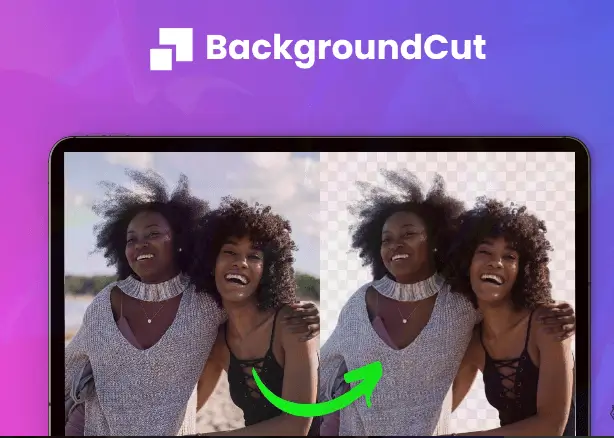
BackgroundCut offers fast, one-click background removal for any image. It saves hours of editing time, making it ideal for solopreneurs and graphic designers. Removing backgrounds from photos can be a tedious and time-consuming task. That’s where BackgroundCut steps in. This advanced tool uses AI and Machine Learning to remove or replace image backgrounds quickly. With features like high-resolution handling and unlimited background removals, it’s designed to make your photo editing tasks easier and faster. Plus, with a one-time payment of $59 for lifetime access, it’s a cost-effective solution. Whether you’re working on personal projects or professional designs, BackgroundCut can save you significant time and effort. Interested in learning more? Check out BackgroundCut here.
Introduction To Backgroundcut
Removing backgrounds from photos can be a tedious and time-consuming process. BackgroundCut offers a solution to this problem. It is a tool designed to remove or replace image backgrounds quickly and effortlessly using Artificial Intelligence and Machine Learning.
What Is Backgroundcut?
BackgroundCut is an advanced tool that makes background removal easy. This tool uses AI to remove the background of any image in seconds. It handles high-resolution images up to 25MP and offers unlimited background removals. Users get 10 API credits per month with unlimited rollover.
Purpose And Target Audience
The main purpose of BackgroundCut is to save time on photo editing tasks. This makes it perfect for solopreneurs and graphic designers. It is also suitable for both professional and personal use.
Here are the main benefits of BackgroundCut:
- Saves significant time on image editing
- Easy to use with a straightforward upload process
- Cost-effective with a one-time payment
- Access to continuous improvements and new features
BackgroundCut also plans to introduce new features, such as integrations with platforms like Zapier and Pabbly, a Chrome plugin, and UI/UX improvements.
| Pricing Details | Refund or Return Policies |
|---|---|
| One-time purchase: $59 Lifetime access |
60-day money-back guarantee Refundable within 60 days of purchase |
For support or feature requests, you can reach out to support@backgroundcut.co.
Key Features Of Backgroundcut
Backgroundcut is a powerful tool designed to make background removal quick and easy. Below, you’ll find the key features that make Backgroundcut an essential tool for solopreneurs and graphic designers alike.
Automatic Background Removal
Backgroundcut uses Artificial Intelligence and Machine Learning to remove or replace image backgrounds effortlessly. With a single-click process, you can achieve professional results in seconds. This feature handles high-resolution images up to 25MP, ensuring top-quality output.
User-friendly Interface
The interface of Backgroundcut is designed for ease of use. The straightforward upload process allows users to start removing backgrounds immediately without any learning curve. This makes it ideal for both professional and personal use.
Batch Processing Capabilities
One of the standout features of Backgroundcut is its ability to process images in batches. This can save you a significant amount of time, especially if you need to edit multiple images at once. Simply upload your images, and let Backgroundcut do the rest.
Integration With Other Tools
Backgroundcut plans to integrate with various platforms to enhance its functionality. Upcoming integrations include platforms like Zapier and Pabbly, which will allow seamless workflow automation. Additionally, a Chrome plugin is in the works to provide even more convenience.
| Feature | Description |
|---|---|
| Automatic Background Removal | AI-powered, single-click background removal for images up to 25MP. |
| User-Friendly Interface | Simple upload process, no learning curve needed. |
| Batch Processing Capabilities | Process multiple images at once to save time. |
| Integration with Other Tools | Upcoming integrations with platforms like Zapier and Pabbly. |
These features collectively make Backgroundcut a cost-effective and time-saving solution for anyone needing quick and efficient background removal.
Pricing And Affordability
BackgroundCut offers a unique solution for quick and easy background removal. Understanding the pricing and affordability of this tool is crucial for deciding if it meets your needs. Let’s delve into the specifics.
Pricing Plans Overview
BackgroundCut features a simple and straightforward pricing plan. Here’s a brief overview:
| Plan | Cost | Features |
|---|---|---|
| Lifetime Access | $59 (One-time Purchase) |
|
Cost Vs. Value Analysis
Analyzing the cost vs. value of BackgroundCut helps understand its true worth. Here are the key points:
- One-time payment: $59 ensures lifetime access, making it a cost-effective choice.
- Unlimited usage: Remove backgrounds from images without worrying about limits.
- High-resolution support: Handle images up to 25MP effortlessly.
- Future updates: Benefit from continuous improvements and new features.
The 60-day money-back guarantee further enhances its value. This policy allows you to try the tool risk-free. If unsatisfied, you can request a full refund within 60 days of purchase.
Considering these points, BackgroundCut offers excellent value for its price, making it a valuable investment for solopreneurs and graphic designers.
Pros And Cons Based On Real-world Usage
BackgroundCut promises to save time and effort by using AI-powered background removal. Let’s delve into the pros and cons of using this tool based on real-world usage.
Pros
| Feature | Details |
|---|---|
| AI-Powered Removal | Uses advanced AI to remove backgrounds quickly and accurately. |
| Single-Click Process | Effortless background removal with just one click. |
| High-Resolution Support | Handles images up to 25MP, ensuring quality is maintained. |
| Unlimited Removals | Remove as many backgrounds as needed without restrictions. |
| Future Updates | Lifetime access to all updates and new features. |
| Cost-Effective | One-time payment of $59 for lifetime access. |
| Money-Back Guarantee | 60-day refund policy if not satisfied. |
| Easy Integration | Future integrations with platforms like Zapier and Pabbly. |
Cons
- Upcoming Integrations: Some features are not yet available but planned for the future.
- API Credits Limit: Limited to 10 API credits per month, though with unlimited rollover.
- No Mobile App: Currently, no dedicated mobile app is available.
- Learning Curve: While easy to use, some may need time to get used to the interface.
Specific Recommendations For Ideal Users Or Scenarios
BackgroundCut is a powerful tool for removing backgrounds from images with ease. Whether you are a professional or a hobbyist, this tool can save you time and effort. Below are specific recommendations for who will benefit the most and ideal use cases.
Who Will Benefit The Most?
BackgroundCut is perfect for:
- Solopreneurs who need to create professional images quickly.
- Graphic Designers working on tight deadlines.
- E-commerce Sellers who need clean product photos.
- Content Creators looking to enhance their visual content.
These users will find BackgroundCut easy to use and a significant time-saver. The single-click process and AI-powered technology make it accessible for everyone, regardless of technical skill level.
Ideal Use Cases
BackgroundCut shines in various scenarios, including:
- Product Photography: Easily remove backgrounds to make product images stand out.
- Social Media Content: Create eye-catching posts with clean, professional images.
- Marketing Materials: Enhance brochures, flyers, and ads with high-quality visuals.
- Personal Projects: Perfect for scrapbooking, collages, and custom cards.
In these use cases, BackgroundCut provides a seamless solution, ensuring high-quality results with minimal effort.
| Main Features | Benefits |
|---|---|
| AI-powered background removal | Saves significant time on image editing |
| Single-click process | Easy to use |
| Handles high-resolution images up to 25MP | Professional quality |
| Unlimited background removal | Cost-effective |
| Lifetime access to updates | Continuous improvements |
For anyone involved in photo editing, BackgroundCut is a valuable tool. It offers a blend of efficiency, simplicity, and high-quality output, making it a worthy investment.
Frequently Asked Questions
What Is Backgroundcut?
Backgroundcut is an online tool for removing backgrounds from images. It uses AI technology to deliver accurate results quickly.
How Does Backgroundcut Work?
Backgroundcut uses advanced AI algorithms. It detects and removes backgrounds automatically, making photo editing easy and efficient.
Is Backgroundcut Easy To Use?
Yes, Backgroundcut is user-friendly. Simply upload your image, and the tool handles the rest.
Can Backgroundcut Handle Complex Backgrounds?
Yes, Backgroundcut can manage complex backgrounds. Its AI technology ensures precise removal, even with detailed images.
Conclusion
BackgroundCut offers a fast, easy, and effective way to remove backgrounds. Its AI-powered features save time, making it ideal for solopreneurs and designers. Simple to use and cost-effective, it provides lifetime access and continuous updates. Considering its benefits and affordable price, BackgroundCut is worth trying for anyone needing efficient photo editing. Check out BackgroundCut here.
