

If you’re tired of the hassle of signing and managing documents, BunnyDoc might be the solution you need. This innovative digital signature application simplifies the process of preparing, sending, signing, and tracking legally binding documents in one place.
BunnyDoc offers a range of features designed to enhance workflow efficiency. With electronic and digital legally-binding eSignatures, you can sign documents online, generate agreements, and negotiate contracts seamlessly. It also provides real-time document tracking, customizable fields, and integration with popular cloud storage services. BunnyDoc ensures the security and legality of your documents with digital certificates and two-factor authentication. Whether you need reusable templates, bulk sending, or public form links for signature collection, BunnyDoc has you covered. Let’s explore what makes BunnyDoc a valuable tool for your document management needs. Ready to streamline your document signing process? Check out BunnyDoc: BunnyDoc.
Introduction To Bunnydoc
BunnyDoc is a digital signature application designed to streamline document signing processes. This article will provide an overview of BunnyDoc, its purpose, and the target audience it serves.
What Is Bunnydoc?
BunnyDoc is a tool that allows users to sign documents, create agreements, and engage in contract negotiations using electronic signatures. It offers legally-binding eSignatures and ensures the security of signed documents.
| Main Features | Details |
|---|---|
| eSignatures | Electronic and digital signatures that are legally binding |
| Online document signing | Allows users to sign documents online |
| Document generation | Create and manage documents easily |
| Signature request monitoring | Track requests in real-time |
| Digital certificates | Provided by AATL |
| Two-factor authentication | Enhances security |
| Audit trail | Keeps track of all activities |
| Customizable fields | Personalize document fields |
| Integrations | Works with Dropbox, Google Drive, and OneDrive |
| GDPR-compliant | Ensures data protection |
Purpose And Target Audience
BunnyDoc aims to enhance workflow efficiency by providing a quick and secure method for document signing. It is ideal for businesses that require frequent signing of documents, such as contracts or agreements.
- Small businesses: Benefit from customizable and reusable templates.
- Large corporations: Utilize bulk sending to streamline the signing process.
- Teams: Facilitate collaboration with multiple team members.
The application supports various needs, ensuring legality and security through features such as audit trails and two-factor authentication.
Overall, BunnyDoc is a comprehensive solution for all your document signing needs.
Key Features Of Bunnydoc
BunnyDoc is an advanced digital signature application designed to streamline the document signing process. With a multitude of features, it ensures that users can sign, create, and track legally binding documents with ease. Let’s dive into the key features that make BunnyDoc a top choice for document management.
BunnyDoc offers a user-friendly interface that simplifies the document signing process. The intuitive layout ensures that users can navigate through the application with ease. Even those who are not tech-savvy will find it easy to use. The clean design and clear instructions help in quickly getting tasks done.
BunnyDoc is equipped with advanced document editing tools. Users can create and customize documents with ease. The platform allows for customizable fields and digital certificates from an AATL provider. This ensures the documents are tailored to specific needs and meet legal standards.
Collaboration is made easy with BunnyDoc’s features. It supports real-time document tracking and signature request monitoring. Teams can work together seamlessly, with bulk sending and folder organization to manage documents efficiently. Integration with Dropbox, Google Drive, and OneDrive enhances file sharing and collaboration.
Security is a top priority for BunnyDoc. It includes two-factor authentication and audit trails for every document. This ensures that all actions are tracked and verified. BunnyDoc is also GDPR-compliant, guaranteeing the privacy and security of user data.
BunnyDoc works across various platforms. It supports integration with popular cloud services like Dropbox, Google Drive, and OneDrive. This cross-platform compatibility ensures users can access and manage their documents from any device, enhancing flexibility and convenience.
Pricing Details:
| Plan | Price | Signature Requests | Team Members | Public Form Links |
|---|---|---|---|---|
| Plan 1 | $69 (One-time payment) | 500 per month | 1 | 1 |
| Plan 2 | $138 (One-time payment) | 1,000 per month | 5 | 5 |
| Plan 3 | $207 (One-time payment) | 1,500 per month | 10 | 10 |
Refund Policy: 60-day money-back guarantee.
User-friendly Interface
BunnyDoc offers a seamless user experience with its User-Friendly Interface. Users can easily navigate through the platform to manage document signing and tracking efficiently. The following sections delve deeper into the intuitive aspects of BunnyDoc’s interface.
Ease Of Navigation
The Ease of Navigation within BunnyDoc stands out. Users can quickly access key features such as:
- Electronic and digital eSignatures
- Document generation and contract negotiation
- Signature request monitoring
- Real-time document tracking
With a clear and concise menu, users can find what they need without hassle. The interface design ensures that even users with minimal tech skills can navigate effortlessly.
Customizable Layout
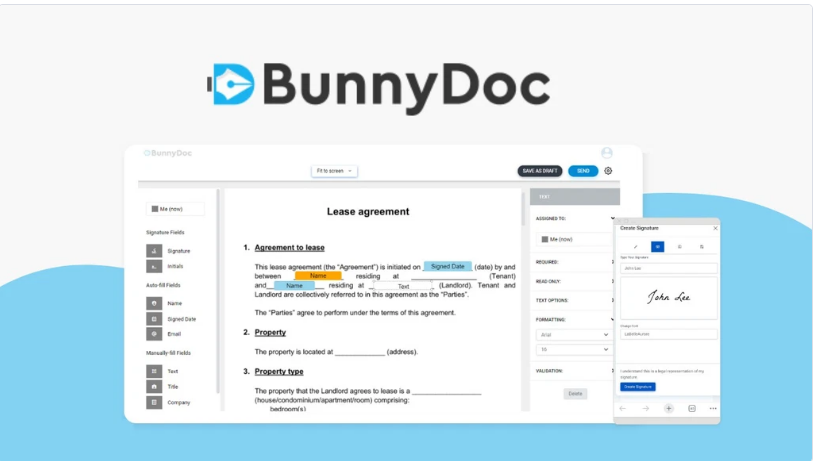
BunnyDoc’s Customizable Layout allows users to personalize their experience. Users can adjust fields and templates to suit their specific needs. This customization enhances workflow efficiency and makes the platform more adaptable to various document signing scenarios.
Key customizable features include:
- Customizable fields for tailored document creation
- Reusable templates for frequently used documents
- Bulk sending capabilities for streamlined processes
By offering these customizable options, BunnyDoc ensures that each user can configure the platform to best fit their unique requirements. This flexibility is beneficial for both individual users and teams.
Credit: saastocked.com
Advanced Document Editing Tools
BunnyDoc offers a comprehensive suite of advanced document editing tools. These tools make document preparation and signing smooth and efficient. Users can create, edit, and format documents with ease. Let’s explore some key features that enhance the document editing experience.
Rich Text Formatting
BunnyDoc’s rich text formatting tools allow users to style their documents effectively. You can bold, italicize, and underline text to emphasize important points. The application also supports bullet points and numbered lists for organizing content clearly.
Users can change font types, sizes, and colors. These options ensure documents are not only functional but also visually appealing. This flexibility is ideal for creating professional contracts and agreements.
Template Library
BunnyDoc includes a diverse template library for different document needs. Users can choose from various templates, which saves time and ensures consistency. Templates are customizable, allowing users to modify fields to suit their specific requirements.
For frequently used documents, BunnyDoc offers reusable templates. This feature is particularly useful for standard contracts and agreements, ensuring that the same format is used each time.
Smart Editing Suggestions
BunnyDoc’s smart editing suggestions enhance document accuracy and professionalism. The application provides real-time suggestions for grammar and spelling corrections. This feature ensures that documents are error-free before they are sent for signatures.
In addition to basic corrections, BunnyDoc offers advanced suggestions. These include improving sentence structure and enhancing clarity, which is crucial for legal documents. This smart editing tool helps users create clear, professional, and legally sound documents.
| Feature | Benefits |
|---|---|
| Rich Text Formatting | Enhanced document styling and organization |
| Template Library | Time-saving, consistency, and customization |
| Smart Editing Suggestions | Improved accuracy and professionalism |
Collaboration And Sharing Capabilities
BunnyDoc offers robust features to facilitate collaboration and sharing of documents. Users can work together in real-time and share documents effortlessly. These capabilities enhance workflow efficiency and ensure legal compliance.
Real-time Collaboration
BunnyDoc provides real-time collaboration features. Team members can work on documents simultaneously. Changes are visible instantly, ensuring everyone is on the same page. This feature is vital for contract negotiations and drafting agreements.
Key features include:
- Simultaneous editing by multiple users
- Instant visibility of changes
- Real-time notifications for updates
Document Sharing Options
Sharing documents with BunnyDoc is simple and secure. The platform offers various options to ensure documents reach the right people. Users can share via public form links or integrations with popular cloud services.
Available sharing options:
- Public form links for easy signature collection
- Integrations with Dropbox, Google Drive, and OneDrive
- Secure email sharing with two-factor authentication
These sharing capabilities make it easy to distribute documents and collect signatures efficiently.

Credit: www.youtube.com
Security And Privacy Measures
When using BunnyDoc, it’s essential to understand the security and privacy measures in place. This ensures that your documents and data remain safe and confidential. BunnyDoc takes several steps to protect your information, including data encryption and user access controls.
Data Encryption
BunnyDoc uses advanced data encryption methods to safeguard your documents. This means that all data transferred between users and the BunnyDoc servers is encrypted. This prevents unauthorized access during transmission.
| Encryption Type | Usage |
|---|---|
| SSL/TLS | Encrypts data in transit |
| AES-256 | Encrypts stored data |
With these encryption methods, BunnyDoc ensures that your data remains secure. Whether you are signing, sending, or storing documents, you can trust that your information is protected.
User Access Controls
BunnyDoc implements robust user access controls to manage who can access your documents. These controls include:
- Two-factor authentication for added security
- Customizable permissions for team members
- Audit trails to monitor user activities
Two-factor authentication requires users to verify their identity through a secondary method. This adds an extra layer of security, reducing the risk of unauthorized access.
Customizable permissions allow you to control who can view, edit, or sign documents. This feature is especially useful for teams, ensuring that only authorized members can access sensitive information.
The audit trail feature tracks all document-related activities. This includes who accessed the document, when they accessed it, and what changes were made. This transparency helps maintain accountability and security.
By implementing these security and privacy measures, BunnyDoc provides a secure environment for managing your documents. You can confidently prepare, send, sign, and track legally binding documents, knowing that your data is protected.
Cross-platform Compatibility
BunnyDoc is a versatile digital signature application. It works seamlessly across various devices. This ensures users can access it from both desktops and mobile devices. The platform’s compatibility enhances its usability and convenience.
Desktop And Mobile Access
BunnyDoc offers a user-friendly interface on both desktop and mobile devices. Users can sign, prepare, and track documents from their preferred device. Whether at the office or on the go, BunnyDoc provides a consistent experience.
Here are key points about its desktop and mobile access:
- Responsive design for desktops and mobile devices.
- Access via web browsers without needing downloads.
- Optimized for various screen sizes and resolutions.
Seamless Syncing
One of BunnyDoc’s standout features is seamless syncing. Changes made on one device reflect instantly on others. This ensures users always have the latest document versions.
Consider these benefits of seamless syncing:
- Real-time updates across all devices.
- Saves time and eliminates manual syncing.
- Ensures document consistency and accuracy.
BunnyDoc’s cross-platform compatibility is crucial for users needing flexible access and real-time updates. It simplifies the document signing process and enhances productivity.
Pricing And Affordability
BunnyDoc offers a range of subscription plans designed to suit various needs and budgets. This section will explore the different subscription plans available and the value for money they provide.
Subscription Plans
BunnyDoc provides three main subscription plans, each with a one-time payment option:
| Plan | Price | Signature Requests/Month | Team Members | Public Form Links | Features |
|---|---|---|---|---|---|
| Plan 1 | $69 (normally $420) | 500 | 1 | 1 |
|
| Plan 2 | $138 (normally $840) | 1,000 | 5 | 5 | All features in Plan 1 |
| Plan 3 | $207 (normally $1,260) | 1,500 | 10 | 10 | All features in Plan 1 |
Value For Money
BunnyDoc ensures excellent value for money with its comprehensive features and affordable pricing:
- One-time payment: Each plan requires only a one-time payment, making it cost-effective.
- Feature-rich plans: Every plan includes essential features like audit trails, reminders, and integrations.
- Scalability: Options to accommodate up to 10 team members and 1,500 signature requests per month.
- Customizability: Customizable fields and reusable templates to streamline the document signing process.
Moreover, BunnyDoc offers a 60-day money-back guarantee, ensuring customer satisfaction and peace of mind.
Pros And Cons Of Bunnydoc
BunnyDoc is a popular digital signature application. It offers a range of features designed to streamline document signing and enhance workflow efficiency. Understanding its strengths and weaknesses can help you decide if it is the right tool for your needs.
Advantages
- Legally-binding eSignatures: BunnyDoc provides electronic and digital signatures that are legally recognized.
- Enhanced Workflow: Quick and secure document signing improves overall efficiency.
- Document Generation: Create agreements and contracts effortlessly.
- Signature Request Monitoring: Track the status of signature requests in real time.
- Integration Capabilities: Integrates with Dropbox, Google Drive, and OneDrive.
- GDPR-compliant: Ensures compliance with GDPR regulations.
- Reusable Templates: Save time with customizable and reusable templates.
- Bulk Sending: Streamline the signing process by sending multiple documents at once.
- Folder Organization: Keep documents organized with folder structures.
Drawbacks
- Limited Team Members: Lower plans allow fewer team members, which may be restrictive for larger teams.
- Price: Although the one-time payment is reduced, the initial cost may still be high for some users.
- Public Form Links: Limited number of public form links in lower plans can be a drawback for extensive use.
- Reduced Branding: Lower plans come with reduced branding options which might not suit all businesses.
| Plan | One-time Payment | Signature Requests/Month | Team Members | Public Form Links |
|---|---|---|---|---|
| Plan 1 | $69 | 500 | 1 | 1 |
| Plan 2 | $138 | 1,000 | 5 | 5 |
| Plan 3 | $207 | 1,500 | 10 | 10 |
Refund Policy: BunnyDoc offers a 60-day money-back guarantee. Users can request a refund within 60 days after purchase if they are not satisfied.
Recommendations For Ideal Users
BunnyDoc is an intuitive digital signature tool designed for seamless document signing. It enhances workflow efficiency and ensures document security. But who exactly stands to benefit the most from this tool?
Best Use Cases
BunnyDoc is ideal for various professional scenarios where quick, secure signatures are crucial. Here are some key use cases:
- Legal Professionals: Streamline contract negotiations and agreement signing.
- Real Estate Agents: Securely sign and track property documents.
- Human Resources: Manage employment contracts and onboarding documents efficiently.
- Sales Teams: Close deals faster with quick document signing.
- Healthcare Providers: Obtain patient consent forms swiftly and securely.
Who Should Use Bunnydoc?
BunnyDoc is perfect for:
- Small to Medium-sized Businesses
- Freelancers and Consultants
- Remote Teams
- Enterprises with frequent document signing needs
Individuals and teams who need a reliable, legally compliant, and user-friendly solution for document management will find BunnyDoc invaluable. Its features like real-time tracking, bulk sending, and customizable templates cater to diverse professional needs.
| Plan | Signature Requests/Month | Team Members | Public Form Links | Price |
|---|---|---|---|---|
| Plan 1 | 500 | 1 | 1 | $69 (One-time) |
| Plan 2 | 1,000 | 5 | 5 | $138 (One-time) |
| Plan 3 | 1,500 | 10 | 10 | $207 (One-time) |
Each plan comes with a 60-day money-back guarantee, providing peace of mind with every purchase. Whether you’re a solo entrepreneur or part of a large team, BunnyDoc offers a plan that fits your needs.

Credit: www.youtube.com
Frequently Asked Questions
What Is Bunnydoc?
Bunnydoc is a user-friendly document management tool. It helps you organize, store, and access documents easily. Ideal for businesses.
How Does Bunnydoc Work?
Bunnydoc uses cloud technology to store and manage your documents. You can upload, organize, and share files securely.
Is Bunnydoc Secure?
Yes, Bunnydoc offers robust security features. It ensures your documents are safe with encryption and access controls.
Can I Use Bunnydoc On Mobile?
Yes, Bunnydoc is mobile-friendly. You can access and manage your documents from any device with an internet connection.
Conclusion
BunnyDoc offers efficient solutions for managing digital signatures. Its features enhance document workflows and ensure security. Whether signing contracts or tracking documents, it simplifies tasks. The customizable templates and integrations with popular cloud services are beneficial. BunnyDoc’s pricing plans are affordable and cater to various needs. The 60-day money-back guarantee provides peace of mind. Ready to streamline your document signing process? Check out BunnyDoc here.
