

Cloud infrastructure management can be complex and time-consuming. Cloudshot aims to simplify this process.
If you’re looking for an all-in-one solution to manage your cloud resources effectively, Cloudshot might be what you need. It offers tools for visualizing, monitoring, and optimizing cloud resources, all in one place. Supporting major cloud providers like Microsoft Azure, AWS, GCP, and Digital Ocean, Cloudshot makes it easy to keep track of your cloud network. With features such as real-time monitoring and cost optimization, it helps you save both time and money. This introduction will guide you through the key aspects of Cloudshot, helping you determine if it’s the right tool for your cloud management needs. Ready to explore Cloudshot? Check it out here.
Credit: cloudshot.com
Introduction To Cloudshot
Cloudshot is transforming the way IT professionals manage their cloud infrastructure. This innovative tool simplifies and automates cloud resource management, making it accessible and efficient for a wide range of users.
What Is Cloudshot?
Cloudshot is an all-in-one solution designed to streamline the management of cloud infrastructure. It provides tools for visualizing, monitoring, controlling, and optimizing cloud resources. Cloudshot supports various cloud providers including Microsoft Azure, AWS, GCP, and Digital Ocean. Soon, it will also support OVH Cloud and Contabo.
Purpose And Target Audience
The primary purpose of Cloudshot is to simplify cloud management. It is designed to make complex cloud infrastructure tasks easier and more intuitive. Cloudshot is ideal for:
- IT professionals looking for a streamlined cloud management solution.
- Security professionals needing real-time monitoring and control.
- Organizations wanting to optimize cloud costs and reduce unnecessary expenses.
Cloudshot’s user-friendly interface, integrating with tools like draw.io, makes it accessible to users with varying levels of expertise.
Main Features
- Visualization: Provides a dynamic, bird’s-eye view of your cloud network using the intuitive interface of draw.io.
- Real-time Monitoring: Automatically captures changes in your network and reflects them instantly in the diagram.
- Terraform Script Generation: Allows easy generation of Terraform scripts and import sets with a simple click.
- Cost Optimization: Offers a detailed breakdown of cloud spending and identifies unnecessary expenses to reduce costs.
- Agentless Management: Manage EC2s or VMs without installing any third-party agents, perform routine tasks, and execute custom commands directly within Cloudshot.
- Third-party Integrations: Easily manage third-party agents like Datadog on multiple servers.
Pricing Details
| Plan | Price | Details |
|---|---|---|
| Pro Plan | $39 (discounted from $1,200) |
|
| Lifetime Deal | Available until Dec 31, 2024 | Early adopters get unrestricted lifetime updates |
Refund Or Return Policies
Cloudshot offers a 60-day money-back guarantee. Customers can try Cloudshot for two months and receive a full refund if they are not satisfied.
Users must redeem their code(s) within 60 days of purchase. A Google or Microsoft email account is required to sign up for Cloudshot.
Discover more about Cloudshot and how it can enhance your cloud management experience by visiting the official Cloudshot website.
Key Features Of Cloudshot
Cloudshot offers a suite of features designed to streamline cloud management. Below are the key features that make Cloudshot a top choice for managing cloud infrastructure.
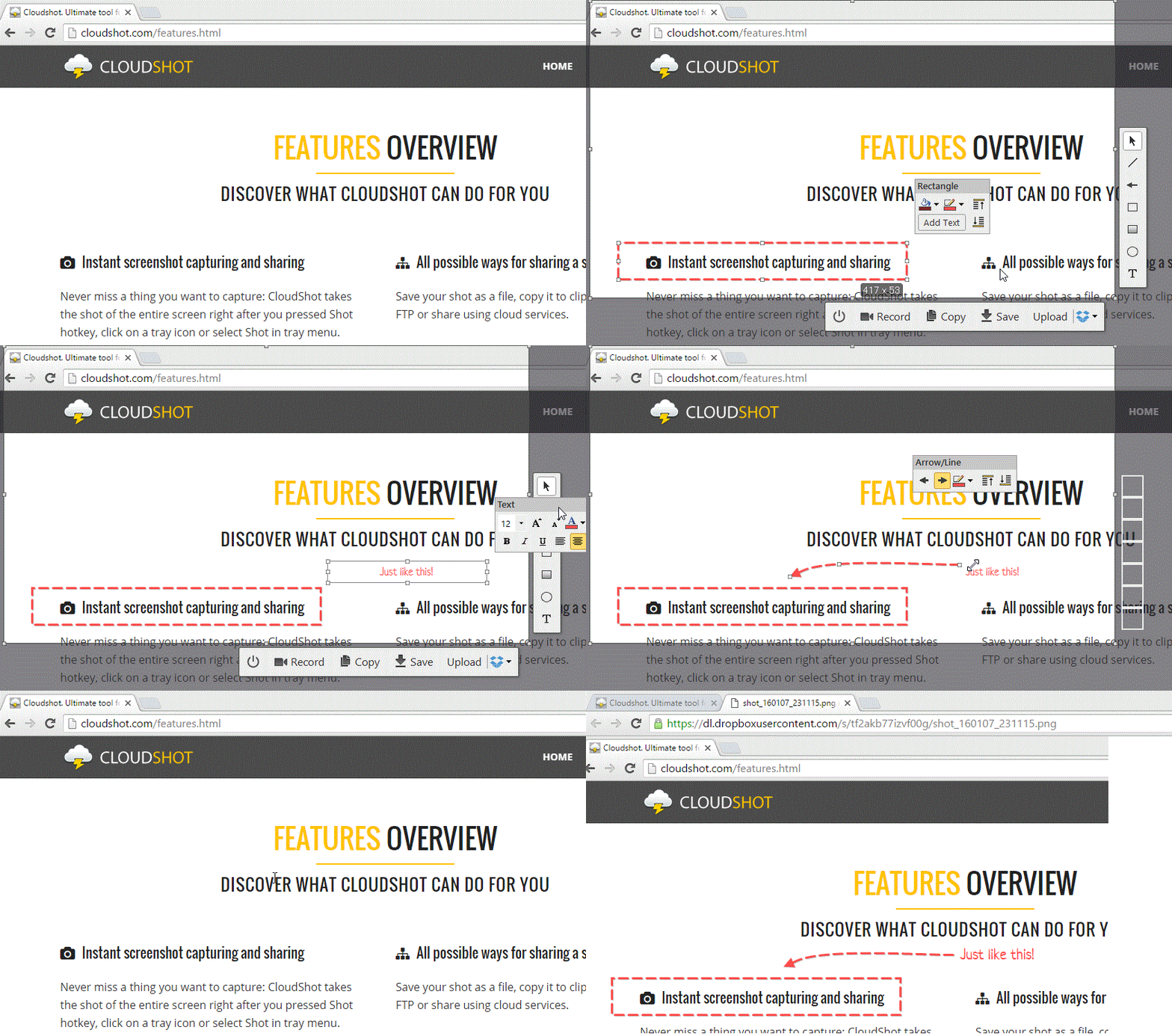
Cloudshot provides powerful screenshot tools. Capture high-quality screenshots with ease. Use it to document configurations, share visual data, or record errors. This feature supports multiple formats, ensuring compatibility with various documentation needs.
With Cloudshot, you have access to integrated cloud storage. Save your screenshots directly to the cloud. This ensures your data is always accessible and secure. Cloudshot supports popular cloud providers like Microsoft Azure, AWS, and GCP.
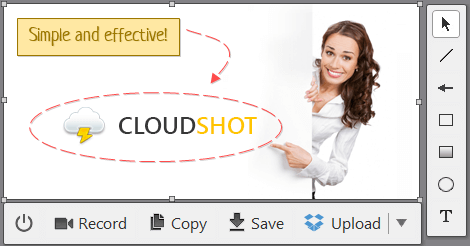
Cloudshot includes robust annotation tools. Add notes, highlight sections, and draw shapes directly on your screenshots. These tools help in making your screenshots more informative. They are ideal for creating guides, tutorials, and reports.
Collaboration is seamless with Cloudshot. Share your screenshots and annotations with team members. Use integrated sharing options to send links via email or messaging apps. This feature supports real-time collaboration, making teamwork more efficient.
Advanced Screenshot Capabilities
Cloudshot offers advanced screenshot capabilities that cater to a variety of needs. Whether capturing a simple screen or recording a detailed walkthrough, Cloudshot provides the tools to make the process seamless and efficient.
Customizable Screenshot Options
With Cloudshot, users can customize their screenshots to fit specific requirements. The tool allows for:
- Full-screen captures: Capture the entire screen with one click.
- Window-specific shots: Focus on a single application window.
- Custom area selection: Select and capture a specific area of the screen.
These customizable options ensure that users can get exactly the shot they need without unnecessary clutter.
Screen Recording Features
Cloudshot’s screen recording features are designed for ease of use and high-quality results. Key features include:
- High-resolution recording: Ensure every detail is captured with clarity.
- Audio integration: Record system sounds and microphone input.
- Editing tools: Trim, annotate, and enhance recordings post-capture.
These features make Cloudshot an excellent choice for creating tutorials, presentations, and walkthroughs.
Credit: cloudshot.com
Integrated Cloud Storage
Cloudshot offers a robust solution for managing cloud infrastructure. Integrated Cloud Storage is one of its most powerful features. It ensures seamless cloud integration, easy access, and effective management of all cloud resources.
Seamless Cloud Integration
Cloudshot supports multiple cloud providers such as Microsoft Azure, AWS, GCP, and Digital Ocean. This wide range of support allows users to integrate their cloud networks effortlessly. The intuitive interface of draw.io helps visualize these integrations, providing a dynamic, bird’s-eye view of your cloud network.
Integration is simplified with the automatic capture of network changes. These changes are reflected instantly in the visual diagram, ensuring you stay up-to-date with your network’s current state. This feature is vital for maintaining an accurate overview of your infrastructure.
Easy Access And Management
Managing and accessing cloud resources is straightforward with Cloudshot. The agentless management capability allows users to manage EC2s or VMs without installing third-party agents. This feature is critical for performing routine tasks and executing custom commands directly within Cloudshot.
Users can also generate Terraform scripts with a simple click. This functionality is crucial for automating infrastructure deployment and maintenance. Cloudshot’s real-time monitoring feature keeps track of changes and updates, ensuring your cloud resources are always under control.
Cloudshot offers a detailed breakdown of cloud spending. It identifies unnecessary expenses, helping users optimize costs and reduce their carbon footprint. This cost optimization feature is essential for efficient cloud resource management.
The integration with third-party agents like Datadog allows for seamless management of multiple servers. This capability enhances the overall control and monitoring of your cloud infrastructure.
Overall, Cloudshot provides a user-friendly interface that integrates with familiar tools. This accessibility makes it suitable for various levels of IT and security professionals.
Annotation Tools
One of the most useful features of Cloudshot is its annotation tools. These tools allow you to easily add notes and highlights to your cloud infrastructure diagrams. You can make your visual data more informative and easier to understand.
Built-in Editing Tools
Cloudshot comes with a variety of built-in editing tools designed to enhance your diagrams. These tools enable you to draw shapes, add text, and insert icons effortlessly. You can also use the drag-and-drop functionality to place elements exactly where you need them. This makes it simple to customize your diagrams to suit your needs.
Highlighting And Markup
The highlighting and markup features allow you to emphasize important areas of your cloud network. You can use different colors to highlight specific sections. This helps in identifying critical components and potential issues quickly. Additionally, you can add annotations to explain or provide context for different parts of the diagram. This is particularly useful for team collaborations and presentations.
Here is a table summarizing the key annotation tools:
| Feature | Description |
|---|---|
| Shapes and Icons | Add various shapes and icons to represent different elements in your cloud infrastructure. |
| Text Annotations | Insert text to label and describe parts of your diagram. |
| Highlighting | Use colors to draw attention to important areas of your diagram. |
| Drag-and-Drop | Easily move elements around to create a clear and organized diagram. |
These annotation tools make Cloudshot not only a powerful visualization tool but also an effective communication tool.
Collaboration And Sharing Options
Cloudshot offers robust collaboration and sharing options, making it easy for teams to work together seamlessly. The platform’s features enable real-time collaboration, multiple sharing formats, and efficient communication within teams.
Real-time Collaboration
With Cloudshot, teams can collaborate in real-time on cloud infrastructure management tasks. The dynamic interface allows multiple users to work on the same project simultaneously. Any changes made by one user are instantly visible to others, ensuring everyone stays on the same page.
This feature is particularly useful for geographically dispersed teams. It eliminates the need for constant back-and-forth communication and reduces the chances of errors. The real-time updates help in maintaining the consistency and accuracy of the cloud infrastructure.
Multiple Sharing Formats
Cloudshot supports multiple sharing formats, making it easy to share diagrams and reports with stakeholders. Users can export diagrams in various formats such as PNG, PDF, and SVG. This flexibility ensures that documents are accessible and readable by anyone, regardless of the software they use.
Sharing options also include direct links to the diagrams. These links can be shared with team members or clients, providing them with instant access to the latest version of the project. The platform also allows for setting permissions, ensuring that only authorized users can view or edit the shared content.
| Format | Use Case |
|---|---|
| PNG | For quick sharing and embedding in presentations. |
| For high-quality prints and detailed reviews. | |
| SVG | For scalable vector graphics that maintain quality. |
These collaboration and sharing options make Cloudshot an excellent tool for teams looking to manage their cloud infrastructure efficiently. By leveraging real-time collaboration and multiple sharing formats, teams can ensure smooth communication and effective project management.
Pricing And Affordability
Understanding the pricing and affordability of Cloudshot is crucial for potential users. Below, we break down the subscription plans, and compare the free and paid features to help you make an informed decision.
Subscription Plans
Cloudshot offers a straightforward pricing model with a significant discount for early adopters. Here’s a detailed look:
| Plan | Cost | Features |
|---|---|---|
| Pro Plan | $39 (discounted from $1,200) |
|
| Lifetime Deal | Available until Dec 31, 2024 | All the features in the Pro Plan plus unrestricted lifetime updates |
Free Vs. Paid Features
Cloudshot does not offer a free tier, but the paid plan is highly comprehensive. Here’s a comparison of the included features:
- Visualization: Both free and paid versions include dynamic visualization of cloud networks.
- Real-time Monitoring: Available only in the paid plan, providing instant updates and changes.
- Terraform Script Generation: This feature is exclusive to the paid plan, simplifying script creation.
- Cost Optimization: Detailed cost analysis and optimization are part of the paid plan.
- Agentless Management: Available only in the paid plan, allowing management without third-party agents.
- Third-party Integrations: Included in the paid plan for seamless management of agents like Datadog.
With a one-time purchase, users get lifetime access to a range of powerful features, making the Pro Plan a cost-effective choice for businesses of all sizes.

Pros And Cons Of Cloudshot
Cloudshot offers a powerful solution for managing cloud infrastructure. It provides numerous features to simplify and automate tasks. Yet, like any tool, it has its pros and cons.
Advantages Of Using Cloudshot
| Feature | Benefit |
|---|---|
| Visualization | Gives a dynamic, bird’s-eye view of your cloud network. |
| Real-time Monitoring | Captures changes instantly and updates the diagram. |
| Terraform Script Generation | Generates scripts and import sets with a click. |
| Cost Optimization | Breaks down cloud spending and identifies unnecessary costs. |
| Agentless Management | Manages EC2s or VMs without third-party agents. |
| Third-party Integrations | Manages agents like Datadog on multiple servers easily. |
Limitations And Drawbacks
- Limited Cloud Providers: Currently supports Azure, AWS, GCP, and Digital Ocean. OVH Cloud and Contabo are coming soon.
- Single User Access: Pro Plan supports only one user and one cloud account.
- Subscription Redeem Time: Users must redeem their code within 60 days of purchase.
- Email Requirement: Requires a Google or Microsoft email to sign up.
Ideal Users And Scenarios For Cloudshot
Cloudshot is a versatile solution designed for managing cloud infrastructure. It offers a range of features that cater to different user needs and scenarios. This section delves into the best use cases and the target professionals who can benefit from Cloudshot.
Best Use Cases
| Use Case | Description |
|---|---|
| Cloud Network Visualization | Provides a dynamic view of cloud networks using draw.io. |
| Real-time Monitoring | Captures network changes and updates diagrams instantly. |
| Terraform Script Generation | Enables easy generation and import of Terraform scripts. |
| Cost Optimization | Breaks down cloud spending and identifies unnecessary expenses. |
| Agentless Management | Manages EC2s or VMs without third-party agents. |
| Third-party Integrations | Manages third-party agents like Datadog on multiple servers. |
Target Professionals
- IT Professionals: Streamline cloud deployment with drag-and-drop functionality.
- Security Teams: Monitor and control cloud resources in real-time.
- Financial Analysts: Optimize cloud costs and reduce unnecessary expenses.
- DevOps Engineers: Generate and manage Terraform scripts effortlessly.
- Cloud Architects: Visualize complex cloud networks easily.
Cloudshot caters to a wide range of professionals by simplifying cloud infrastructure management. Its user-friendly interface and robust features make it a valuable tool for anyone involved in cloud management.

Frequently Asked Questions
What Is Cloudshot?
Cloudshot is a screenshot tool for taking, editing, and sharing screenshots quickly. It offers intuitive features for easy use.
How Does Cloudshot Work?
Cloudshot allows you to capture your screen, annotate images, and share them instantly. It’s user-friendly and efficient.
Is Cloudshot Free?
Cloudshot offers a free version with basic features. There is also a premium version with advanced functionalities.
Can Cloudshot Edit Screenshots?
Yes, Cloudshot includes editing tools like cropping, highlighting, and adding text. It’s great for detailed annotations.
Conclusion
Cloudshot offers a comprehensive solution for cloud management. Its intuitive interface and powerful features simplify cloud infrastructure tasks. From real-time monitoring to cost optimization, Cloudshot addresses key pain points. Managing cloud resources becomes seamless and efficient. Consider trying Cloudshot to enhance your cloud management experience. For more details, visit the official Cloudshot page. Embrace a smoother, more efficient cloud journey with Cloudshot.
