

Coming Soon & Maintenance Mode pricing can vary greatly. Understanding these costs helps you make informed decisions.
Creating anticipation for a new website or managing site updates can be challenging. That’s where the Coming Soon & Maintenance Mode plugin comes in handy. This WordPress tool allows users to build custom Coming Soon pages and handle maintenance effortlessly. With over 170 themes, a drag-and-drop builder, and integrations with popular image libraries, it offers impressive customization. You can also share work-in-progress sites with secret links and manage multiple sites from a centralized dashboard. For just $69 per year, you get a comprehensive tool that simplifies site management and enhances your online presence. Explore the plugin here: Coming Soon & Maintenance Mode.
Introduction To Coming Soon And Maintenance Mode Tools
The Coming Soon & Maintenance Mode plugin is an essential tool for WordPress users. It helps create custom Coming Soon and maintenance pages effortlessly. This tool is perfect for generating buzz for upcoming websites and managing site maintenance efficiently.
What Are Coming Soon And Maintenance Mode Tools?
Coming Soon and Maintenance Mode tools allow website administrators to display a custom page while the main site is under construction or maintenance. These pages can include information about the site’s launch, contact details, and even subscription forms to collect leads.
The Coming Soon & Maintenance Mode plugin offers:
- Over 170 professional themes
- Drag-and-drop builder for easy customization
- Integrations with Depositphotos and Unsplash for rich media
- Video backgrounds to make pages engaging
- Secret links to share work-in-progress with clients
- Selective page display for Coming Soon mode
- Centralized dashboard for managing licenses and sites
The Importance Of Using These Tools For Your Website
Using Coming Soon and Maintenance Mode tools is crucial for various reasons:
- Professional Appearance: A well-designed Coming Soon or maintenance page gives a professional look to your site.
- Lead Generation: Collect emails and build your audience before the site launches.
- SEO Benefits: Maintain your site’s SEO rankings even during downtime.
- Centralized Management: Manage multiple sites and licenses from one dashboard.
- GDPR Compliance: Ensure your site meets legal requirements.
With the Coming Soon & Maintenance Mode plugin, you can create engaging placeholder pages and manage site status effectively. This tool ensures your audience remains informed and engaged, helping you attract leads even before your site goes live.
| Plan | Price | Features |
|---|---|---|
| Annual Agency Plan | $69 per year (discounted from $99) | Includes 1 Year of updates, limited to 50 sites |
For more details or upgrades, contact the support team via email. Note: This plugin is compatible only with WordPress and is available in English.
Don’t miss the opportunity to make the best use of Coming Soon & Maintenance Mode plugin to manage your website’s downtime efficiently and professionally.
Key Features Of Coming Soon And Maintenance Mode Tools
Coming Soon & Maintenance Mode offers a suite of powerful features. These features help you effectively manage your site’s placeholder and maintenance pages. The tool ensures your brand remains professional and engaging even before your site launch.
Customizable Templates: Tailoring The Look To Your Brand
With over 170 professional themes, you can easily tailor the look of your Coming Soon pages to fit your brand. The drag-and-drop builder allows you to customize every aspect without needing to code. Integrations with Depositphotos and Unsplash provide access to millions of images. This makes it easy to find the perfect visuals for your pages.
Email Capture Forms: Building Your Email List Before Launch
Collecting emails before your site goes live is crucial. Coming Soon & Maintenance Mode includes email capture forms. These forms help you build your email list and ensure you’re ready to engage with your audience from day one. Use the autoresponder and emailing services to keep your subscribers updated.
Social Media Integration: Connecting With Your Audience Early
Connecting with your audience early can build anticipation. This tool integrates with popular social media platforms. Share your progress and updates effortlessly. Ensure your followers are always in the loop about your upcoming site launch.
Countdown Timers: Creating Anticipation And Urgency
Creating a sense of urgency can boost interest in your site. Countdown timers are a great way to do this. Add countdown timers to your Coming Soon pages to let visitors know when your site will be live. This feature builds anticipation and excitement.
Seo Optimization: Ensuring Search Engine Visibility
SEO is critical even for Coming Soon pages. Coming Soon & Maintenance Mode ensures your placeholder pages are optimized for search engines. This helps your site gain visibility and rank better even before the official launch. The best-in-class SEO setup ensures your site is search-engine friendly from the start.
Analytics And Reporting: Tracking Visitor Engagement
Understanding how visitors interact with your Coming Soon page is important. This tool provides comprehensive analytics and reporting features. Track visitor engagement, see which elements are working, and adjust your strategy accordingly. Use the centralized dashboard for easy management and control.
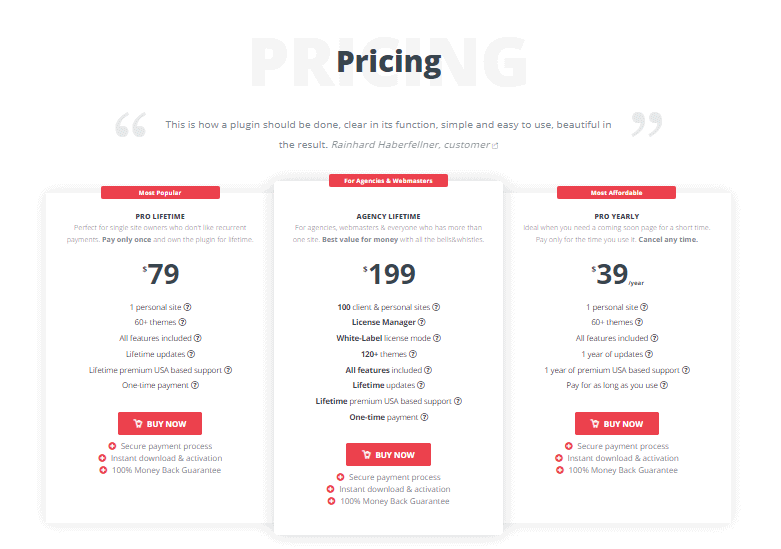
Pricing And Affordability Breakdown
The Coming Soon & Maintenance Mode plugin offers flexible pricing options to suit various needs. Understanding the differences between free and paid plans, monthly and annual plans, and the features included in each pricing tier will help you make an informed decision.
Free Vs. Paid Options: What’s The Difference?
The free version of the Coming Soon & Maintenance Mode plugin provides basic functionalities. It allows you to create simple Coming Soon pages and manage basic maintenance modes. However, the paid version unlocks a host of advanced features.
- Free Version: Basic themes, limited customization, and essential maintenance tools.
- Paid Version: Access to over 170 professional themes, drag-and-drop builder, video backgrounds, integrations with Depositphotos and Unsplash, secret links for work-in-progress sites, and full rebranding options.
Monthly Vs. Annual Plans: Which Is More Cost-effective?
Choosing between monthly and annual plans can impact your budget. The annual plan offers significant savings compared to the monthly option.
| Plan | Monthly Cost | Annual Cost |
|---|---|---|
| Monthly Plan | $9.99 per month | $119.88 per year |
| Annual Plan | N/A | $69 per year (discounted from $99) |
Opting for the annual plan at $69 per year saves you $50.88 compared to paying monthly.
Features Included In Different Pricing Tiers
Different pricing tiers come with varying features, ensuring you get the best value for your needs.
- Basic Tier (Free Version):
- Basic themes
- Essential maintenance tools
- Pro Tier (Annual Agency Plan):
- Over 170 professional themes
- Drag-and-drop builder
- Video backgrounds
- Integrations with Depositphotos and Unsplash
- Secret link to share work-in-progress sites
- Selective page display for Coming Soon mode
- Centralized dashboard for remote control
- Full rebranding options
- GDPR-compliant
- White-label capabilities
The Pro Tier offers comprehensive features to help you create professional and engaging Coming Soon and maintenance pages effortlessly.
Credit: www.webfactoryltd.com
Pros And Cons Of Coming Soon And Maintenance Mode Tools
Implementing Coming Soon and Maintenance Mode tools can significantly enhance the user experience and streamline website management. These tools, like the Coming Soon & Maintenance Mode plugin, offer various advantages and some limitations. Let’s explore the pros and cons of using these tools in detail.
Advantages: Enhancing User Experience And Engagement
Utilizing Coming Soon and Maintenance Mode tools offers several advantages:
- Professional Appearance: Over 170 professional themes ensure that your placeholder pages look polished and engaging.
- Customization: The drag-and-drop builder allows for easy customization without requiring coding skills.
- Media Integration: Integrations with Depositphotos and Unsplash provide access to millions of images and video backgrounds to enhance visual appeal.
- Preview and Share: A secret link feature enables you to share work-in-progress sites with stakeholders.
- Selective Page Display: You can choose which pages display the Coming Soon mode, offering flexibility in presentation.
- Centralized Management: The centralized dashboard helps manage multiple sites and licenses efficiently.
- GDPR Compliance: Ensures that your placeholder pages meet data protection regulations.
- Email Collection: Collect emails and integrate with autoresponder services to engage potential leads.
Disadvantages: Potential Drawbacks And Limitations
While these tools provide numerous benefits, they also come with some limitations:
- Language Limitation: The plugin is available only in English, which may not suit non-English websites.
- Platform Restriction: It is compatible only with WordPress, limiting its use to WordPress sites.
- Site Limit: The annual license covers up to 50 sites, which may be insufficient for larger agencies.
- Additional Costs: Lifetime deal upgrades require contacting support, potentially incurring extra costs.
Despite these drawbacks, the benefits of using Coming Soon and Maintenance Mode tools often outweigh the limitations, making them a valuable asset for website management and user engagement.
Specific Recommendations For Ideal Users Or Scenarios
Choosing the right Coming Soon & Maintenance Mode plugin can be a game-changer for your website strategy. Knowing when and how to use these modes can significantly impact your site’s success. Below are some specific recommendations tailored for different scenarios and ideal users.
Best Use Cases For New Website Launches
Launching a new website is exciting but can be stressful. Using a Coming Soon page can help manage that stress. Here are the best use cases:
- Building Hype: Create anticipation and collect leads before the official launch.
- Testing: Test your website in a controlled environment before going live.
- SEO: Optimize your Coming Soon page to start ranking even before the full site is live.
With over 170 professional themes and a drag-and-drop builder, creating an engaging Coming Soon page is straightforward.
Using Maintenance Mode For Website Updates And Repairs
Maintenance Mode is essential for keeping your site functional during updates or repairs. Here are some situations where it is most useful:
- Scheduled Updates: Inform visitors about scheduled maintenance without disrupting their experience.
- Unexpected Issues: Quickly activate Maintenance Mode to address unexpected problems.
- Site Redesigns: Use it while redesigning your site to ensure a smooth transition.
This plugin offers features like a secret link to share work-in-progress sites, making it easier to get feedback while keeping the site under wraps.
Ideal Users: Startups, Small Businesses, And Large Enterprises
This plugin is versatile and suits various users:
| Type | Benefit |
|---|---|
| Startups | Generate interest and collect emails before launching. |
| Small Businesses | Manage site updates without losing customers. |
| Large Enterprises | Centralized control for multiple sites and licenses. |
The Annual Agency Plan priced at $69 per year (discounted from $99) makes it an affordable choice for all business sizes. The plan includes updates for one year and is suitable for up to 50 sites.
With a 60-day money-back guarantee, you can try it risk-free. For more details, visit the official product page.
Conclusion: Maximizing Your Website’s Potential
In today’s digital landscape, having a well-optimized Coming Soon or Maintenance Mode page is crucial. Utilizing the Coming Soon & Maintenance Mode plugin can significantly enhance your website’s performance and user engagement. This tool offers a variety of features that can help you create professional placeholder sites with ease. Let’s delve into the key benefits and how to choose the right tool for your needs.
Summarizing The Benefits Of Coming Soon And Maintenance Mode Tools
The Coming Soon & Maintenance Mode plugin provides several features that can help you maximize your website’s potential:
- Over 170 professional themes to choose from.
- A drag-and-drop builder for easy customization.
- Integration with Depositphotos and Unsplash for access to millions of images.
- Video backgrounds to make your pages more engaging.
- Secret link sharing to preview and share work-in-progress sites.
- Selective page display for Coming Soon mode.
- A centralized dashboard for managing licenses and multiple sites.
- Full rebranding options without coding.
- GDPR-compliant and white-label capabilities.
These features not only help you create visually appealing pages but also ensure that your site’s SEO is optimized. The ability to collect emails and use autoresponder services further enhances your lead generation efforts.
Final Thoughts On Choosing The Right Tool For Your Needs
When selecting a Coming Soon or Maintenance Mode tool, consider the following factors:
| Feature | Details |
|---|---|
| Customization | Ensure the tool offers easy customization options, like a drag-and-drop builder and various themes. |
| Integration | Look for integrations with image and video libraries like Depositphotos and Unsplash. |
| Management | A centralized dashboard can simplify managing multiple sites and licenses. |
| GDPR Compliance | Ensure the tool is GDPR-compliant to protect user data. |
The Coming Soon & Maintenance Mode plugin ticks all these boxes and offers a competitive pricing plan. The annual agency plan is available for $69 per year, discounted from $99. It includes one year of updates and supports up to 50 sites.
With a 60-day money-back guarantee, you can try the plugin risk-free. For more details or to upgrade to a lifetime deal, contact the support team via email.

Credit: blanc-creme.com
Frequently Asked Questions
What Is Coming Soon Mode?
Coming Soon mode is a website feature that displays a placeholder page. It informs visitors that the website is under construction.
Why Use Maintenance Mode?
Maintenance mode is used to perform updates or fixes. It temporarily restricts access while ensuring visitors know the site is being worked on.
How To Enable Coming Soon Mode?
To enable Coming Soon mode, use a plugin or a built-in feature. This helps inform visitors about the upcoming launch.
What Are Maintenance Mode Benefits?
Maintenance mode improves user experience by showing a friendly message. It prevents visitors from encountering errors during updates.
Conclusion
Choosing the right tool for your Coming Soon, and maintenance pages is crucial. With Coming Soon & Maintenance Mode, you get professional themes and easy customization. This plugin helps you manage site status and attract leads effectively. Plus, it’s affordable and comes with a 60-day money-back guarantee. Consider this plugin for a seamless website launch experience.
