

Transforming speech into text has never been easier. Letterly is an AI-powered app that does just that.
Imagine speaking and instantly seeing your words turned into perfectly written messages, notes, or content. Available on iPhone, Android, Web, and Mac, Letterly syncs across all your devices. This app supports multiple languages and offers various rewrite options to match your style. Letterly can enhance your communication, social media posts, note-taking, and journaling. Want to quickly write smarter and better? Discover the amazing features of Letterly below. Ready to explore Letterly? Visit the official site here.
Introduction To Letterly And Its Purpose
In today’s fast-paced world, communication is key. Letterly provides a seamless way to transform your speech into perfectly written text. This AI-powered app helps you write messages, take notes, and create content effortlessly.
What Is Letterly?
Letterly is an innovative AI-powered app that converts your speech into well-written text. It is available on multiple platforms including iPhone, Android, Web, and Mac. This ensures you can access your notes and messages anytime, anywhere.
| Platform | Availability |
|---|---|
| iPhone | Yes |
| Android | Yes |
| Web | Yes |
| Mac | Yes |
Letterly supports multiple use cases such as:
- Communication
- Social media posts
- Note-taking
- Journaling
Additionally, it offers 25+ rewrite options to match any tone or style and supports translation in 90+ languages.
Why Effective Communication Matters
Effective communication is crucial in both personal and professional settings. Letterly helps you quickly turn your speech into clear, structured text, preserving your tone and ensuring your message is well-received.
Key benefits include:
- Effortlessly create engaging social media content
- Organize thoughts and ideas with structured text
- Seamlessly save and send polished texts
The app’s offline and screen-off recording capabilities ensure you can capture your thoughts anytime.
With Letterly, you can write smarter, faster, and better.
Key Features Of Letterly
Letterly offers a range of powerful features that make it an essential tool for anyone looking to transform speech into well-written text effortlessly. Here are the key features that set Letterly apart:
Letterly provides a variety of customizable templates to suit different writing needs. Whether it’s for communication, social media posts, or journaling, you can find a template that fits your style. These templates help structure your thoughts and ideas, making writing faster and more efficient.
With its AI-powered speech-to-text conversion, Letterly turns your spoken words into polished text seamlessly. The app offers 25+ rewrite options to match any tone or style, ensuring your text preserves your unique voice. This feature is available on iPhone, Android, Web, and Mac platforms.
Letterly supports real-time collaboration, allowing multiple users to work together on the same document. This feature is perfect for team projects, brainstorming sessions, and collaborative note-taking. Syncing across devices ensures that everyone stays updated with the latest changes.
Letterly comes equipped with advanced formatting tools that enhance the presentation of your text. You can easily apply bold, italics, bullet points, and ordered lists to organize and highlight key information. These tools help you create professional-looking content quickly.
One of the standout features of Letterly is its integrated language translation capability. The app supports text translation in over 90 languages, making it a valuable tool for global communication. Whether you need to translate a message or create multilingual content, Letterly has got you covered.
Overall, the combination of these features makes Letterly a versatile and powerful writing assistant. It helps you write smarter, faster, and better, ensuring your messages and content are always polished and professional.
Customizable Templates
Letterly offers a variety of customizable templates, making content creation seamless. Whether drafting a message, note, or social media post, the templates save time and enhance productivity. Let’s explore the features that make these templates stand out.
Variety Of Templates Available
Letterly provides a diverse selection of templates to suit different needs. Users can find templates for:
- Communication
- Social media posts
- Note-taking
- Journaling
These templates are designed to cater to various styles and tones, ensuring the text matches the user’s intent.
Ease Of Personalization
Personalizing templates in Letterly is straightforward. The app offers 25+ rewrite options, allowing users to adjust the tone and style. Additionally, the AI-powered speech-to-text conversion preserves the user’s unique voice. This ensures the final text feels authentic and personalized.
Saving Time And Effort
Using Letterly’s customizable templates significantly reduces the time spent on writing. The speech-to-text feature quickly converts spoken words into written text. Users can then select a suitable template and make minor adjustments. This process streamlines content creation, enabling users to focus on other tasks.
| Plan | Price | Device Licenses | Features |
|---|---|---|---|
| Plan 1 | $69 | 1 | Unlimited recordings, transcriptions, and rewrites, 27 rewrite options, 90+ languages, 15 minutes per recording |
| Plan 2 | $138 | 2 | Unlimited recordings, transcriptions, and rewrites, 27 rewrite options, 90+ languages, 15 minutes per recording |
| Plan 3 | $207 | 4 | Unlimited recordings, transcriptions, and rewrites, 27 rewrite options, 90+ languages, 15 minutes per recording |
Users can choose from three pricing plans to access these features. Each plan offers unlimited recordings, transcriptions, and rewrites. This ensures flexibility and value for money.
Credit: www.b12.io
Ai-powered Writing Assistance
Letterly offers a powerful AI-powered writing assistance feature. This helps users transform their speech into well-written text effortlessly. It is designed for quick message writing, note-taking, and content creation. The app is available on multiple platforms, ensuring seamless access anywhere, anytime.
Grammar And Spell Check
Letterly’s AI ensures your text is free from grammatical errors and spelling mistakes. This feature is crucial for maintaining professionalism and clarity. The app automatically detects and corrects errors, saving you time and effort.
Tone And Style Suggestions
Letterly offers over 25 rewrite options to match any tone or style. Whether you need a formal email or a casual social media post, the app adapts to your needs. It preserves your unique voice while enhancing the readability of your text.
Content Optimization
Letterly’s AI optimizes your content for better engagement and clarity. It helps structure your thoughts and ideas into well-organized text. This feature ensures your messages are impactful and easy to understand.
With these features, Letterly helps you write smarter, faster, and better. Transform your speech into polished text with ease and efficiency.
Real-time Collaboration
Letterly offers real-time collaboration features that make working with teams seamless. This feature is designed to enhance productivity and ensure everyone stays on the same page. Let’s dive into the specifics of these collaboration tools.
Multi-user Editing
With multi-user editing, multiple team members can work on the same document simultaneously. This feature ensures that everyone can contribute their ideas without waiting for their turn.
Key benefits of multi-user editing include:
- Instant updates and changes are visible to all collaborators.
- Reduced time spent on coordinating edits and revisions.
- Smooth workflow as all inputs are integrated in real-time.
Commenting And Feedback Features
Letterly includes robust commenting and feedback features that facilitate clear communication among team members. Users can leave comments, suggest edits, and provide feedback directly within the document.
Highlights of these features:
- Tag team members to address specific points.
- Resolve comments once addressed to keep the document clutter-free.
- Track discussions and decisions within the document.
Improving Team Productivity
The collaboration tools in Letterly significantly improve team productivity. By enabling real-time editing and streamlined feedback, teams can accomplish more in less time.
How Letterly boosts productivity:
- Eliminates the need for multiple document versions.
- Ensures everyone is working on the most up-to-date content.
- Speeds up the review and approval process.
These features make Letterly an essential tool for any team looking to enhance their collaborative efforts.
Advanced Formatting Tools
Letterly offers a range of advanced formatting tools that help users create polished and professional content. These tools are designed to enhance the appearance and readability of your text, making it suitable for various purposes, including communication, social media posts, and note-taking.
Professional Appearance
With Letterly’s advanced formatting tools, your text will have a professional appearance. These tools include:
- Bold and italic text options
- Bullet points and numbered lists for better organization
- Header tags (H1, H2, H3) for structured content
These features ensure that your messages and notes are clear and well-organized, helping you communicate more effectively.
Custom Styling Options
Letterly provides various custom styling options to suit your needs. You can:
- Choose from 25+ rewrite options to match your desired tone or style
- Translate text into 90+ languages for global communication
- Sync your styled text across all devices for consistent formatting
These options allow you to personalize your content and make it more engaging for your audience.
Ease Of Use
One of the standout features of Letterly’s advanced formatting tools is their ease of use. The interface is intuitive and user-friendly, making it simple for anyone to format their text. Key ease-of-use features include:
- Offline and screen-off recording capabilities
- Seamless integration across iPhone, Android, Web, and Mac
- GDPR-compliant to ensure your data privacy
These features make it easy for users to create well-formatted text quickly and efficiently, regardless of their technical expertise.
With Letterly’s advanced formatting tools, you can write smarter, faster, and better, ensuring your content is always polished and professional.
Integrated Language Translation
Letterly’s integrated language translation feature makes global communication simple. This tool allows users to translate text into over 90 languages effortlessly. Whether you’re communicating with international clients or friends, this feature ensures your message is clear and accurate.
Supporting Global Communication
Letterly supports global communication by breaking down language barriers. The app translates your speech into text, then converts that text into the desired language. This makes it easier to communicate with people from different linguistic backgrounds.
- Translate text into 90+ languages
- Available on mobile and desktop platforms
- Syncs translations across devices
Accuracy And Reliability
Accuracy and reliability are vital for effective communication. Letterly ensures your translations are precise, preserving the original meaning. The AI-powered engine behind Letterly is designed to provide high-quality translations, minimizing errors and misunderstandings.
| Feature | Details |
|---|---|
| Translation Languages | 90+ |
| Rewrite Options | 25+ |
| GDPR-compliant | Yes |
User-friendly Interface
Letterly’s interface is user-friendly, making it easy for anyone to use. The app is designed with simplicity in mind, allowing users to navigate and translate text without hassle. Whether you’re tech-savvy or not, you can enjoy the benefits of seamless translation.
- Open the Letterly app
- Select the language you want to translate to
- Speak or input the text you want to translate
- Receive the translated text instantly
With these steps, users can quickly translate and communicate efficiently.
Pricing And Affordability
When considering a new app, pricing and affordability are key factors. With Letterly, you get access to powerful features at competitive prices. Let’s explore the details.
Subscription Plans
Letterly offers three subscription plans to suit different needs:
| Plan | Price (Discounted) | Device Licenses | Features |
|---|---|---|---|
| Plan 1 | $69 (originally $200) | 1 device |
|
| Plan 2 | $138 (originally $400) | 2 devices |
|
| Plan 3 | $207 (originally $800) | 4 devices |
|
Value For Money
Letterly provides excellent value for money. Each plan includes:
- Unlimited recordings and transcriptions
- Native support for iOS, Android, Web, and Mac
- 27 rewrite options
- Support for 90+ languages
- 15-minute recording limit per session
Whether you need one device or four, Letterly’s plans offer flexibility and affordability.
Free Vs. Paid Features
Letterly does not have a free plan. However, the paid plans come with numerous benefits:
- Unlimited recordings and transcriptions
- Access to all platform versions
- 27 different rewrite options to suit any style
- Recognition of over 90 languages
- 15 minutes per recording, ensuring you capture all your thoughts
Paying for a plan ensures you get the most out of Letterly, with full access to its features.
Pros And Cons Of Letterly
Letterly is an AI-powered app that converts speech into perfectly written text. It has several features and benefits, but it also has its drawbacks. Let’s dive into the advantages and potential drawbacks of using Letterly.
Advantages Of Using Letterly
- GDPR-compliant: Ensures data privacy and security.
- AI-powered speech-to-text conversion: Transforms speech into text effortlessly.
- Cross-platform availability: Use it on iPhone, Android, Web, and Mac.
- Syncs across devices: Access your content from anywhere.
- Multiple use cases: Ideal for communication, social media, note-taking, and journaling.
- 25+ rewrite options: Match any tone or style you desire.
- Translation function: Supports text translation in 90+ languages.
- Offline recording: Record and convert speech even without an internet connection.
- Screen-off recording: Continue recording even when your screen is off.
Potential Drawbacks
- Cost: The plans can be expensive for some users.
- Device limitation: Plan 1 offers only one device license.
- Recording limit: Each recording is limited to 15 minutes.
User Feedback And Reviews
Users have generally praised Letterly for its ease of use and efficiency. Here’s a summary of user feedback:
| Positive Feedback | Negative Feedback |
|---|---|
|
|
Overall, Letterly offers a robust solution for turning speech into text, with some areas for improvement based on user feedback.
Recommendations For Ideal Users
Letterly transforms your speech into polished text, making it a versatile tool for various users. Whether you are a professional, student, or social media enthusiast, Letterly offers features that cater to your needs. Let’s dive into the best use cases, target audience, and scenarios where Letterly shines.
Best Use Cases
Letterly is designed to enhance productivity and streamline communication. Here are some of the best use cases:
- Communication: Quickly convert spoken words into well-written messages, emails, or reports.
- Social Media Posts: Create engaging content for social media platforms effortlessly.
- Note-Taking: Capture notes during meetings, lectures, or brainstorming sessions.
- Journaling: Maintain a daily journal by speaking your thoughts and letting Letterly do the writing.
Target Audience
Letterly is ideal for a wide range of users. Here’s a breakdown of the target audience:
- Professionals: Business people, writers, and marketers who need to produce high-quality text quickly.
- Students: College and high school students who need to take notes or write essays.
- Social Media Enthusiasts: Influencers and content creators who want to generate engaging posts.
- Multilingual Users: Those who need to write or translate text in multiple languages.
Scenarios Where Letterly Shines
There are specific scenarios where Letterly truly shines:
- On-the-Go Recording: Use offline and screen-off recording capabilities to capture your thoughts anytime, anywhere.
- Device Syncing: Seamlessly sync your notes and messages across iPhone, Android, Web, and Mac.
- Tone Matching: Utilize the 25+ rewrite options to match any tone or style, perfect for diverse writing needs.
- Language Translation: Translate text into over 90 languages, making it a valuable tool for global communication.
With its powerful features, Letterly is a valuable tool for anyone looking to write smarter, faster, and better. Explore the full potential of Letterly and make your communication seamless and effective.
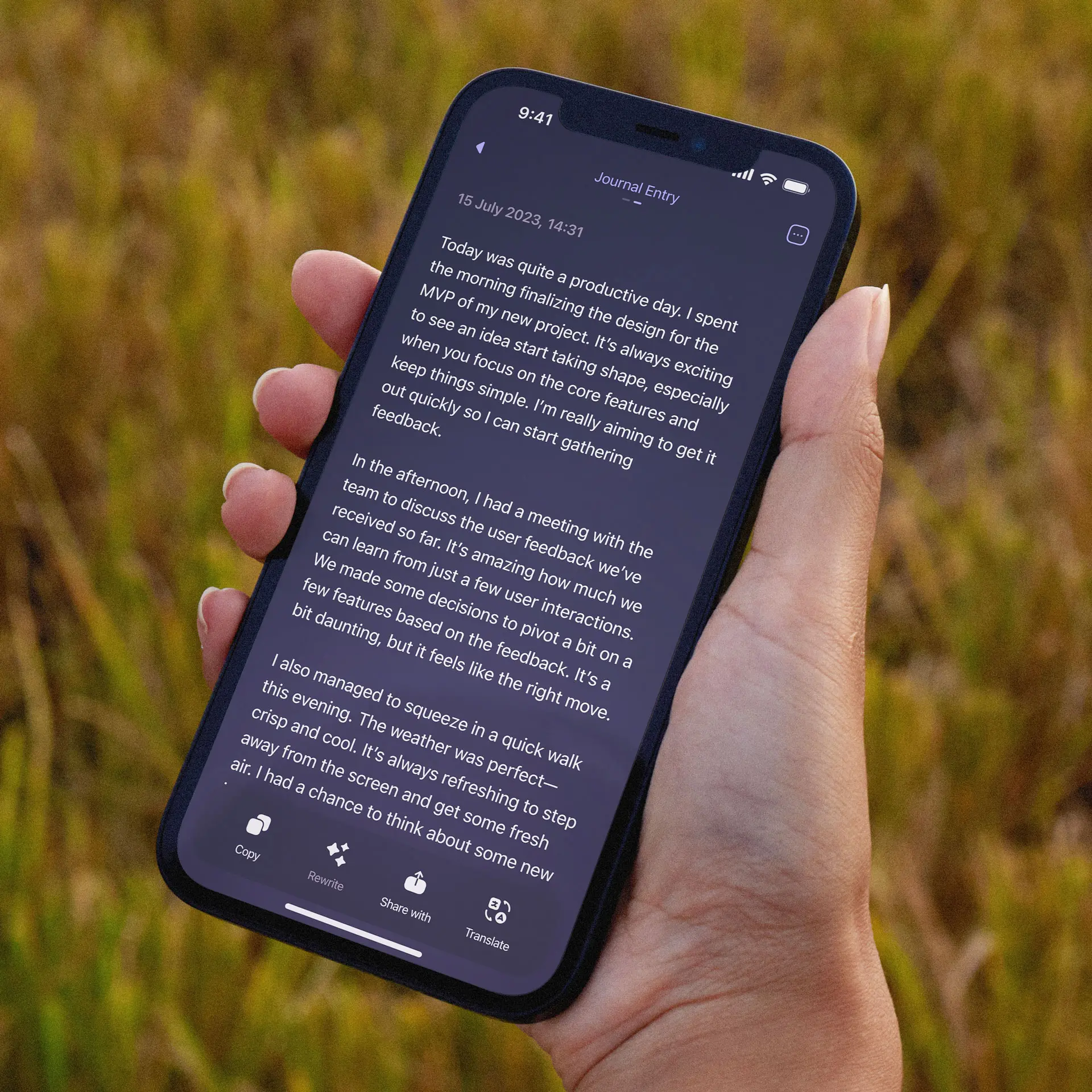
Credit: letterly.app
Frequently Asked Questions
What Are The Main Features Of Letterly?
Letterly offers a variety of features including customizable templates, easy-to-use design tools, and seamless integration. It also provides analytics to track performance, ensuring your letters are effective.
How Does Letterly Improve Letter Writing?
Letterly simplifies letter writing by providing pre-designed templates and intuitive tools. It saves time and ensures your letters look professional, enhancing communication.
Can I Track My Letters With Letterly?
Yes, Letterly includes analytics that allow you to track the performance of your letters. This helps you understand their effectiveness and make necessary adjustments.
Is Letterly User-friendly?
Absolutely, Letterly is designed to be user-friendly with an intuitive interface. Even those with no design experience can create professional letters easily.
Conclusion
Letterly offers a simple way to turn speech into text. The app supports many devices and syncs across all of them. It helps create polished messages, notes, and social media posts quickly. With features like translation in 90+ languages and offline recording, it’s versatile and user-friendly. Plans start at just $69, offering great value. Try Letterly today and make your writing tasks easier. Check it out here.
