

In today’s digital age, creating high-quality audio and video content is crucial. Trebble Online Audio & Video Editor promises to simplify this process with ease.
This review will explore how Trebble can transform your editing experience. Trebble is an innovative tool designed for both beginners and experts. It uses transcription-based editing to streamline the audio and video editing process. By leveraging AI, Trebble removes filler words, long pauses, and enhances poor recordings. This makes your content sound professionally produced without the steep learning curve. With features like a built-in library of license-free music and sound effects, Trebble ensures a comprehensive editing experience. Plus, it’s entirely browser-based, so no software download is needed. Let’s dive deeper into what makes Trebble a standout choice in the editing world. Discover more about Trebble and see if it’s the right fit for you by visiting the official product page here.
Introduction To Trebble Online Audio And Video Editor
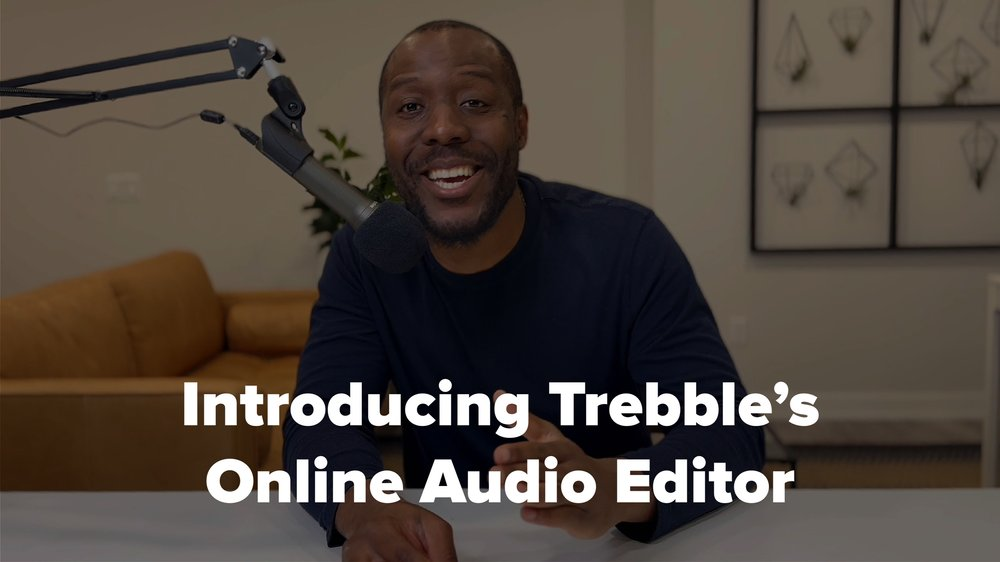
Trebble Online Audio & Video Editor is a cutting-edge tool designed to make audio and video editing as simple as editing a text document. This software aims to help users create professional-quality content with minimal effort. Whether you are a beginner or an experienced editor, Trebble offers features that cater to all skill levels.
What Is Trebble?
Trebble Online Audio & Video Editor is an innovative online platform that uses transcription-based editing to streamline the audio and video editing process. By leveraging AI technology, Trebble automatically removes filler words, long pauses, and enhances poor recordings. This makes editing faster and more efficient compared to traditional methods.
Purpose And Target Audience
The primary purpose of Trebble is to simplify the creation of professional-quality spoken-word audio and video content. Its intuitive interface and AI-powered features are designed to save time and effort for users. Trebble is ideal for:
- Podcasters
- Content creators
- Educators
- Business professionals
These users benefit from Trebble’s ability to edit content by making changes to the transcribed text. This feature makes the editing process more accessible, especially for those with limited technical skills.
| Main Features | Benefits |
|---|---|
| Transcription-Based Editing | Easy to use, short learning curve |
| AI-Powered Enhancements | Automatically removes filler words, improves audio quality |
| Built-In Library | Access to license-free music and sound effects |
| Audio and Video Editing | Edit videos as easily as audio |
| Transcription Download | Download transcripts for accessibility and SEO |
| No Software Download Required | Entirely browser-based for convenience |
With Trebble, creating high-quality audio and video content has never been easier. Its user-friendly features and AI capabilities make it a valuable tool for anyone looking to produce professional-grade media.
Key Features Of Trebble
Trebble Online Audio & Video Editor stands out for its unique features. These features make it a top choice for anyone looking to edit spoken audio or video content effortlessly. Let’s explore the key features that make Trebble an excellent tool for both beginners and professionals.
Trebble boasts a user-friendly interface that simplifies the editing process. The platform is designed for easy navigation, allowing users to focus on their creative work without getting bogged down by complicated menus.
| Feature | Description |
|---|---|
| Intuitive Design | Easy to navigate, even for beginners. |
| Clear Layout | Organized tools for seamless editing. |
Trebble offers a range of advanced editing tools that cater to various needs. From basic cuts to intricate edits, the platform has it all.
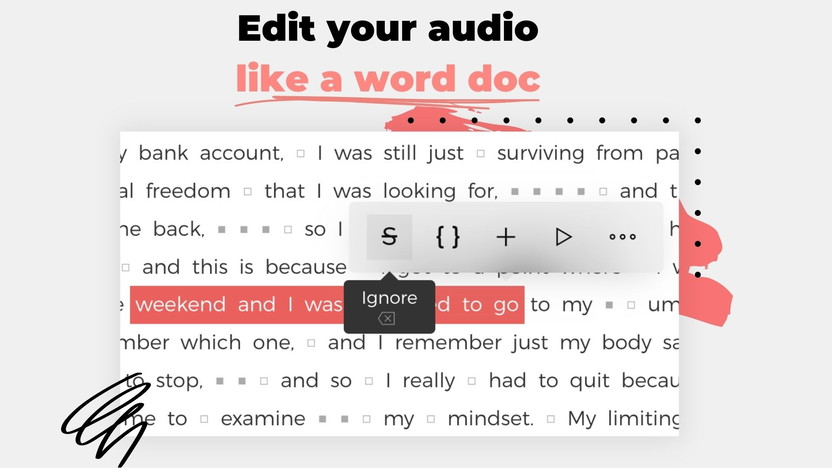
- Transcription-Based Editing: Edit by modifying the transcribed text.
- AI-Powered Enhancements: Remove filler words and long pauses automatically.
- Automatic Noise Removal: Improve audio quality with ease.
Integration with other platforms is a significant feature. Trebble allows for seamless integration with various services, making it easy to share and collaborate.
- Direct Upload: Share directly to social media platforms.
- Collaboration Tools: Work with team members effortlessly.
Enhance your projects with Trebble’s extensive library of effects and transitions. The built-in library provides a wide range of options to add a professional touch to your content.
- License-Free Music: Access a diverse collection of background music.
- Sound Effects: Use various sound effects to enrich your audio.
One of Trebble’s standout features is its real-time collaboration capabilities. This allows multiple users to work on the same project simultaneously.
- Collaborative Editing: Edit with team members in real-time.
- Instant Feedback: Receive immediate input from collaborators.
In summary, Trebble Online Audio & Video Editor offers a comprehensive suite of features designed to make audio and video editing straightforward and professional. Whether you are a beginner or a seasoned editor, Trebble has the tools you need to create high-quality content efficiently.
User-friendly Interface
The Trebble Online Audio & Video Editor boasts a user-friendly interface that makes editing a breeze. Its design caters to both beginners and experienced users, ensuring a smooth and efficient workflow.
Intuitive Layout And Navigation
Navigating through Trebble’s interface is straightforward. The intuitive layout presents all necessary tools and options clearly, allowing users to find what they need without confusion. The main dashboard offers quick access to recent projects, making it easy to pick up where you left off.
- Clear menus and toolbars
- Easy access to recent projects
- Simple, understandable icons
The interface is designed to minimize distractions. Users can focus on their editing tasks without being overwhelmed by unnecessary features. The layout is both clean and functional, which helps in maintaining a steady editing pace.
Customizable Workspaces
Trebble allows users to customize their workspace according to their preferences. This flexibility enhances the editing experience, making it more personalized and efficient.
| Feature | Description |
|---|---|
| Drag-and-Drop Panels | Arrange panels to suit your workflow. |
| Resizable Windows | Adjust the size of windows for better visibility. |
| Save Layouts | Save preferred layouts for quick setup. |
These customizable options contribute to a more tailored editing environment. Editors can maximize their productivity by setting up their workspace in a way that best suits their needs.
In summary, Trebble’s user-friendly interface, featuring an intuitive layout and customizable workspaces, ensures a seamless and efficient editing experience for all users.
Advanced Editing Tools
Trebble Online Audio & Video Editor offers a range of advanced editing tools that elevate the user experience. These tools ensure your audio and video content is polished and professional. Let’s explore some of the key features under this category.
Precision Editing Capabilities
Trebble‘s transcription-based editing allows you to edit audio and video by simply modifying the transcribed text. This method is intuitive and user-friendly, making it accessible even for beginners. The AI technology embedded in Trebble automatically removes filler words and long pauses, enhancing the editing precision significantly.
Multi-track Editing
With Trebble, you can easily manage and edit multiple tracks simultaneously. This feature is particularly useful for complex projects involving various audio and video elements. The multi-track interface is designed to be straightforward, ensuring that users can focus on creativity without getting bogged down by technical details.
Audio Enhancements And Filters
Audio enhancements are where Trebble truly shines. The Magic Sound Enhancer™ technology automatically improves audio quality, removing background noise and optimizing sound levels. Users can also apply various filters and effects from the built-in library to add a professional touch to their projects. These enhancements ensure your final product sounds as though it was produced in a high-end studio.
| Feature | Description |
|---|---|
| Transcription-Based Editing | Edit by modifying transcribed text. |
| AI-Powered Enhancements | Automatically remove filler words and long pauses. |
| Multi-Track Editing | Edit multiple tracks simultaneously with ease. |
| Magic Sound Enhancer™ | Automatically improve audio quality. |
| Built-In Library | Access a variety of filters and effects. |
By leveraging these advanced editing tools, Trebble ensures that your audio and video content is not only high-quality but also easy to produce. The software’s user-friendly design and powerful features make it a valuable tool for both beginners and experienced users.
Seamless Integration With Other Platforms
The Trebble Online Audio & Video Editor stands out with its seamless integration capabilities. This feature ensures users can easily connect and utilize the editor with various platforms. Let’s explore the details under the subheadings below.
Easy Import And Export
Trebble simplifies the import and export process. Users can import audio and video files from multiple sources without hassle.
Key Points:
- Drag-and-drop functionality for quick file uploads.
- Supports importing from cloud storage services like Google Drive and Dropbox.
- Export edited files directly to social media platforms or save them to your computer.
Compatibility With Popular Formats
Trebble ensures compatibility with a wide range of popular audio and video formats. This makes it a versatile tool for users with different needs.
Supported Formats:
- Audio: MP3, WAV, AAC, and more.
- Video: MP4, AVI, MOV, and others.
This broad compatibility ensures users can work with various file types without any compatibility issues. This feature enhances the user experience and makes editing more efficient.
Library Of Effects And Transitions
One of the standout features of the Trebble Online Audio & Video Editor is its extensive library of effects and transitions. This library enhances the editing process, providing users with tools to create polished and professional audio and video content. The library is easy to navigate and offers a variety of visual effects and audio transitions that cater to different editing needs.
Variety Of Visual Effects
Trebble’s library includes a wide range of visual effects that can be applied to video content. These effects can make your videos more engaging and visually appealing. Users can choose from options like:
- Color Correction: Adjust the colors in your video to create the desired mood.
- Filters: Apply various filters to give your videos a unique look.
- Transitions: Smoothly transition between scenes with effects like fades and wipes.
Each visual effect is designed to be user-friendly, allowing even beginners to enhance their videos with ease.
Audio Transitions And Filters
The audio editing capabilities of Trebble are equally impressive. The software provides a range of audio transitions and filters that help to create seamless and professional-sounding audio tracks. Key features include:
- Crossfades: Smoothly blend two audio clips together.
- Noise Reduction: Automatically remove background noise to improve audio clarity.
- Volume Adjustment: Easily control the volume levels to ensure balanced audio.
These audio tools are designed to save time and enhance the quality of your content, making it sound like it was produced in a professional studio.
Real-time Collaboration
In today’s fast-paced world, working together in real-time is crucial. Trebble Online Audio & Video Editor makes this easy with its collaboration features. Teams can edit, share, and receive feedback on projects instantly. This ensures efficiency and high-quality results.
Collaborative Editing Features
Trebble offers several features that support collaborative editing:
- Simultaneous Editing: Multiple users can edit the same project at the same time.
- Real-Time Updates: Changes appear instantly, keeping everyone on the same page.
- Version History: Track changes and revert to previous versions if needed.
- Commenting: Leave notes and comments directly on the timeline for seamless communication.
Sharing And Feedback Tools
Sharing and receiving feedback is vital for refining projects. Trebble provides tools to make this process smooth:
- Easy Sharing: Share your project with a simple link, no downloads needed.
- Role-Based Access: Control who can edit and who can view the project.
- Integrated Chat: Use the built-in chat to discuss changes without leaving the platform.
- Feedback Collection: Collect feedback in one place, making it easy to track and implement.
Trebble’s collaboration features make it an excellent choice for teams. Whether you are editing audio or video, these tools ensure that your project is polished and professional.

Pricing And Affordability
Trebble Online Audio & Video Editor offers a cost-effective solution for creating high-quality spoken-word content. Understanding the pricing structure is essential for users to determine the best plan for their needs.
Subscription Plans
Trebble provides a single plan at a one-time cost of $69 (originally priced at $239.88). This plan includes 120 minutes of audio transcription per month and grants users lifetime access to the Trebble Online Audio Editor.
| Plan | Cost | Audio Transcription Minutes | Access |
|---|---|---|---|
| Single Plan | $69 (one-time) | 120 minutes/month | Lifetime |
Users can also stack additional codes, each providing an extra 120 minutes of transcription per month.
Free Vs. Paid Features
Trebble’s paid plan includes a range of features that enhance the user experience:
- Transcription-Based Editing: Edit audio and video by modifying the transcribed text.
- AI-Powered Enhancements: Automatically remove filler words, long pauses, and improve audio quality.
- Built-In Library: Access a collection of license-free music and sound effects.
- Audio and Video Editing: Use features like automatic noise removal and sound enhancement.
- Transcription Download: Download corrected transcripts as text files for accessibility and SEO purposes.
The paid plan ensures users benefit from all these features without restrictions, making it a comprehensive tool for both beginners and professionals.
Additionally, Trebble offers a 60-day money-back guarantee, allowing users to test the software and request a full refund if not satisfied within the trial period.
Pros And Cons Of Trebble
Trebble Online Audio & Video Editor offers a unique approach to editing audio and video content. Its transcription-based editing and AI-powered enhancements make it a tool worth considering. Below, we explore the advantages and limitations of using Trebble.
Advantages Of Using Trebble
- Ease of Use: The short learning curve makes it suitable for beginners.
- Transcription-Based Editing: Edit audio and video by making changes to the transcribed text.
- AI-Powered Enhancements: Automatically remove filler words, long pauses, and improve audio quality.
- Built-In Library: Access a library of license-free music and sound effects.
- Browser-Based: No software download required, making it convenient.
- Time-Saving: Faster editing process compared to traditional methods.
- Professional Quality: Enhances recordings to sound like they were made in a professional studio.
- Cost-Effective: Saves money on purchasing additional audio resources.
- Accessibility: Makes audio content more accessible through downloadable transcripts.
Drawbacks And Limitations
- Limited Transcription Minutes: Only 120 minutes of audio transcription per month included.
- Additional Costs: Need to purchase extra codes for more transcription minutes.
- Internet Dependency: Being browser-based, it requires a stable internet connection.
Despite these limitations, Trebble’s features and benefits make it a valuable tool for audio and video editing.
Credit: appsumo.com
Recommendations For Ideal Users
Trebble Online Audio & Video Editor is designed for a wide range of users. Its features cater to both beginners and professionals. Whether you’re a content creator or a business owner, Trebble can make your editing tasks simpler and more efficient.
Best Use Cases
Trebble is ideal for various scenarios. Here are some of the best use cases:
- Podcasters: Edit spoken-word audio seamlessly using transcription-based editing.
- Content Creators: Enhance video and audio content with ease.
- Educators: Create and edit educational videos for online courses.
- Business Owners: Produce professional-quality promotional videos and podcasts.
- Journalists: Transcribe and edit interviews for publication.
Who Should Use Trebble?
Trebble is suitable for the following users:
| User Type | Benefits |
|---|---|
| Beginners | Short learning curve, easy transcription-based editing. |
| Professionals | High-quality audio and video enhancements. |
| Content Creators | Access to a library of license-free music and sound effects. |
| Businesses | Efficient editing process saves time and money. |
| Educators | Downloadable transcripts for accessibility. |
With Trebble, users from various fields can produce professional-quality content effortlessly. The AI-powered enhancements and transcription-based editing make it a valuable tool for anyone looking to improve their audio and video projects.
Frequently Asked Questions
What Is Trebble Online Editor?
Trebble Online Editor is a web-based tool for audio and video editing. It offers user-friendly features for both beginners and professionals.
How To Use Trebble Online Editor?
To use Trebble Online Editor, simply upload your media files and start editing. The interface is intuitive and easy to navigate.
Is Trebble Online Editor Free?
Trebble Online Editor offers both free and premium plans. The free plan includes basic features, while the premium plan offers advanced tools.
What Features Does Trebble Online Editor Offer?
Trebble Online Editor provides features like trimming, merging, and adding effects. It supports various file formats and offers a user-friendly interface.
Conclusion
Trebble Online Audio & Video Editor simplifies audio and video editing. Its transcription-based editing and AI enhancements make it user-friendly. You can easily create professional-quality content. Trebble saves time and offers cost-effective solutions. Its lifetime access and future updates provide excellent value. Try it now with the 60-day money-back guarantee. Check out Trebble Online Audio & Video Editor today.
