

Managing schedules can be challenging. That’s where scheduling software steps in.
When I Work scheduling software is a robust tool designed to streamline employee management. It helps organize shifts, track time, and communicate with staff effortlessly. Whether you run a small business or a large enterprise, this software is a game-changer for efficient scheduling.
It reduces errors, saves time, and boosts productivity. Imagine having a reliable assistant that manages your team’s work hours and keeps everything in order. That’s what you get with When I Work scheduling software. This introduction aims to provide an overview of its features and benefits, setting the stage for a deeper dive into how it can transform your scheduling process.

Credit: www.zoomshift.com
Introduction To When I Work
Managing a workforce can be challenging. The right tools can make all the difference. One such tool is When I Work. This scheduling software aims to simplify workforce management. It offers user-friendly features to streamline employee schedules.
Overview Of The Tool
When I Work is a cloud-based scheduling software. It helps managers create, modify, and share work schedules. The platform supports mobile and desktop access. Employees can view schedules from anywhere. The software also enables shift swapping and time-off requests. This keeps everyone on the same page.
Importance Of Workforce Management
Effective workforce management ensures productivity. It helps in meeting business goals. Proper scheduling reduces conflicts. It ensures that each shift is adequately staffed. This boosts employee satisfaction and customer service. When I Work makes workforce management efficient and less stressful.
Key Features
When I Work Scheduling Software offers many features to simplify workforce management. Key features include shift scheduling and employee time tracking. These tools enhance productivity and streamline operations.
Shift Scheduling
Scheduling shifts is easy with When I Work. Managers can create and adjust schedules quickly. Employees can view their schedules anytime. This ensures everyone knows their shifts.
The software allows shift swapping. Employees can swap shifts with approval. This reduces scheduling conflicts. Managers save time on manual scheduling.
Automated reminders notify employees about their shifts. This reduces no-shows and tardiness. It keeps the team organized and informed.
Employee Time Tracking
When I Work also excels in time tracking. Employees can clock in and out using their phones. This feature ensures accurate time records.
Managers can monitor attendance in real-time. They can see who is working and who is late. This helps in managing labor costs and productivity.
The software tracks overtime and breaks. It ensures compliance with labor laws. This protects the business from potential fines.
Reports generated from time tracking data help in payroll processing. They ensure employees are paid accurately. This fosters trust and satisfaction among the workforce.
Related: What is Employee Scheduling Software: Boost Efficiency & Productivity
User-friendly Interface
When I Work Scheduling Software stands out with its user-friendly interface. This feature makes it easy for managers and employees to navigate. It simplifies scheduling tasks, ensuring efficiency and accuracy. Let’s explore the key aspects of this interface.
Intuitive Design
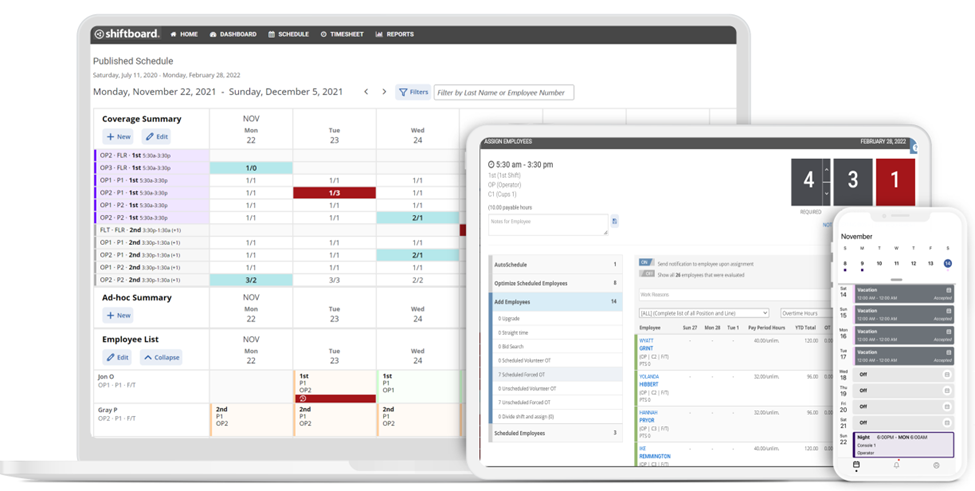
The intuitive design of When I Work Scheduling Software is remarkable. It uses clear icons and straightforward labels. This reduces the learning curve for new users. Managers can create schedules with a few clicks. Employees can view their shifts instantly. The dashboard is clean and clutter-free. Users find what they need without confusion.
Mobile App Functionality
The mobile app functionality of When I Work is a strong point. It allows access to schedules anytime, anywhere. The app is compatible with both iOS and Android devices. Users receive real-time notifications about shift changes. They can easily swap shifts or request time off. The app’s design mirrors the desktop version. This ensures a seamless experience across devices.
Related: Tidycal Feature: Simplify Your Scheduling with Ease
Integration Capabilities
When I Work Scheduling Software offers seamless integration capabilities. This feature connects with various third-party applications and services. Integration capabilities enhance the usability and functionality of the software. Let’s explore the details under two main subheadings.
Third-party Integrations
When I Work Scheduling Software integrates with many popular third-party tools. These include payroll systems, HR software, and communication platforms. Users can connect their favorite apps for a smooth workflow. This integration reduces manual data entry and errors. It also ensures that all systems work together efficiently.
Seamless Data Sync
Seamless data sync is another key feature. It ensures that data updates in real time across all platforms. Employees and managers always see the latest schedules and information. This synchronization saves time and improves accuracy. It also helps in keeping everyone on the same page.
Benefits For Businesses
Discover the numerous benefits for businesses when using When I Work Scheduling Software. This powerful tool can transform your business operations, making scheduling and managing employees more efficient and less time-consuming. Let’s dive into how When I Work can enhance productivity and cost efficiency for your business.
Improved Productivity
When I Work Scheduling Software helps improve productivity by streamlining the scheduling process. Managers can create and share schedules in minutes. This saves time and reduces errors. Employees can view their schedules on their phones. They get notifications for changes, ensuring they are always in the loop.
The software also allows for easy shift swaps and time-off requests. This reduces the administrative burden on managers. It also ensures that shifts are always covered. This leads to a more efficient and happy workforce.
Cost Efficiency
Using When I Work Scheduling Software can lead to significant cost savings. Automated scheduling reduces the need for manual input. This minimizes the risk of overtime costs and scheduling conflicts. Accurate scheduling ensures that you have the right number of staff at all times.
The software also helps track employee hours and attendance. This ensures accurate payroll processing. Businesses can avoid costly payroll errors and overpayments. The reduced administrative workload can lead to lower labor costs.
| Feature | Benefit |
|---|---|
| Automated Scheduling | Reduces manual input and errors |
| Mobile Access | Employees can view schedules on their phones |
| Shift Swaps | Easy management of shift changes |
| Time-off Requests | Streamlines request approvals |
| Employee Tracking | Ensures accurate payroll processing |
Credit: www.shiftboard.com
Employee Experience
Improving the employee experience is key to a productive workplace. When I Work Scheduling Software makes this easier. It focuses on user-friendly features and effective communication. These aspects help create a positive environment for employees.
Ease Of Use
When I Work Scheduling Software is easy to navigate. Employees can access their schedules with a few clicks. This reduces confusion and saves time. The interface is intuitive and clean. There is no need for extensive training.
Employees can update their availability with ease. They can also request time off quickly. The software sends notifications for schedule changes. This keeps everyone on the same page.
Enhanced Communication
Communication is essential in any workplace. When I Work Scheduling Software enhances this. It has built-in messaging features. Employees can chat with each other easily. They can ask questions or share updates.
Team managers can send announcements to all staff. This ensures important information is not missed. The software supports group messages and one-on-one chats. This flexibility improves team collaboration.
Employees can also leave notes on their shifts. This helps in smooth shift transitions. Everyone is aware of the important details. These features improve overall communication and reduce misunderstandings.
Case Studies
Case studies provide real-life examples of how When I Work Scheduling Software has helped businesses across different industries. These stories showcase the benefits and effectiveness of the software, highlighting its impact on workforce management.
Success Stories
Many companies have improved their scheduling processes with When I Work Scheduling Software. Below are a few success stories:
- ABC Café: A popular café chain reduced scheduling conflicts by 80%. They also reported increased employee satisfaction.
- XYZ Retail: A retail store with 50 employees saw a 50% reduction in time spent on scheduling. This allowed managers to focus on customer service.
- LMN Healthcare: This healthcare provider improved shift coverage and reduced overtime costs by 30%. The software helped maintain staff availability and patient care.
Industry Applications
When I Work Scheduling Software is versatile and can be applied to various industries. Here are a few examples:
| Industry | Application |
|---|---|
| Food Service | Manage peak hours, employee availability, and reduce no-shows. |
| Retail | Ensure adequate staffing during busy seasons and streamline shift swaps. |
| Healthcare | Maintain staff availability, manage shift rotations, and reduce overtime costs. |
| Hospitality | Coordinate housekeeping, front desk, and maintenance staff schedules. |
These examples illustrate how When I Work Scheduling Software can benefit a wide range of industries. The software adapts to the unique needs of each sector, enhancing efficiency and employee satisfaction.
Getting Started
Getting started with When I Work Scheduling Software is straightforward. This tool helps businesses manage employee schedules. Follow this guide to set up your account and get the most out of its features.
Sign-up Process
The sign-up process is quick and easy.
- Visit the When I Work website.
- Click the Sign Up button.
- Enter your email address and create a password.
- Fill in your business details.
- Click Create Account.
You will receive a confirmation email. Click the link in the email to activate your account.
Initial Setup Tips
Once you have signed up, follow these tips to set up your account:
- Complete your profile: Add your business name, address, and contact information.
- Set up locations: If you have multiple locations, add each one separately.
- Add employees: Enter employee names, roles, and contact details.
- Customize schedules: Create templates for different shifts and roles.
- Configure notifications: Set up email or SMS alerts for schedule changes.
These steps will help you get started with When I Work Scheduling Software. Happy scheduling!
Pricing Plans
When I Work Scheduling Software offers various pricing plans to suit different business needs. Each plan is designed to provide the best value, ensuring that you only pay for what you need. Let’s explore the different packages and how to choose the right plan for your business.
Different Packages
When I Work Scheduling Software provides three main packages:
| Package | Features | Price |
|---|---|---|
| Basic |
|
$2 per user/month |
| Pro |
|
$4 per user/month |
| Enterprise |
|
Contact for pricing |
Choosing The Right Plan
Choosing the right plan depends on your business needs. Here are some tips:
- Evaluate the size of your team. Larger teams may need more advanced features.
- Consider your budget. Ensure you get the best value for your money.
- Think about the features you need. Don’t pay for features you won’t use.
- Take advantage of free trials. Test the software before making a decision.
By considering these factors, you can select the best plan for your business. Remember, the right plan will help you manage your team effectively and save money.
Related: Kiwilaunch Pricing: Unlocking Affordable Innovation
Customer Support
Customer Support is a vital aspect of any scheduling software. When I Work Scheduling Software excels in providing exceptional customer support. They offer various resources and contact options to assist users at any time.
Help Resources
When I Work provides a comprehensive help center. It includes:
- Documentation: Step-by-step guides and manuals.
- FAQs: Answers to common questions.
- Video tutorials: Visual guides for better understanding.
- Community forum: Engage with other users and experts.
These resources ensure that users can find answers independently. It saves time and enhances user experience.
Contact Options
If users need direct assistance, When I Work offers various contact options:
| Method | Details |
|---|---|
| Email support | Send a detailed message to the support team. |
| Live chat | Instant messaging with support agents for quick answers. |
| Phone support | Talk directly with a support representative. |
These options ensure users can get help in their preferred way. The flexibility in contact methods is beneficial for all users.

Credit: www.selectsoftwarereviews.com
Frequently Asked Questions
What Is When I Work Scheduling Software?
When I Work Scheduling Software is a tool for employee scheduling and time tracking. It helps businesses manage shifts, availability, and labor costs efficiently.
How Does When I Work Improve Scheduling?
When I Work simplifies scheduling by automating shifts and managing employee availability. It reduces scheduling conflicts and ensures optimal coverage.
Can When I Work Track Employee Hours?
Yes, When I Work tracks employee hours accurately. It integrates with timesheets and payroll systems, making time management effortless.
Is When I Work User-friendly?
When I Work is designed to be user-friendly. Its intuitive interface allows easy schedule creation and management, even for beginners.
Conclusion
Using When I Work Scheduling Software can simplify your team’s workflow. It saves time, reduces errors, and enhances productivity. The intuitive design makes it easy for anyone to use. You will find managing schedules becomes less stressful. Start exploring its features today.
Your team will thank you for it.
