

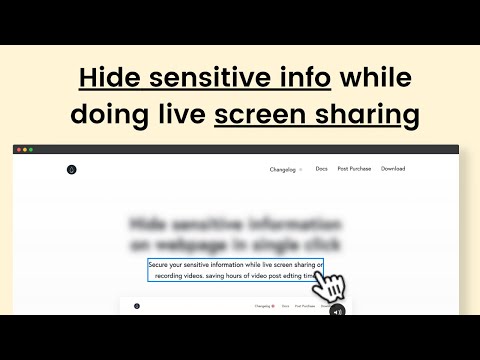
Privacy matters when sharing your screen. Blurweb App is here to help.
This browser extension makes it easy to blur sensitive data instantly. No need for post-production edits. Blurweb App is designed for video creators and professionals who often share screens. With just a single click, you can blur images, text, or input fields on your browser. This ensures that confidential information stays hidden during live sessions or recordings. Compatible with popular tools like Google Meet, Loom, Microsoft Teams, and Zoom, Blurweb App offers a seamless experience across different platforms. It’s also GDPR-compliant, adding an extra layer of data privacy. Discover how Blurweb App can make your screen-sharing secure and efficient by visiting their official website. Stay tuned to learn more about its features and benefits.
Credit: www.blurweb.app
Introduction To Blurweb App
In today’s digital world, protecting sensitive information is crucial. Whether you are a video creator, content sharer, or conducting a live session, you need a reliable tool to ensure data privacy. That’s where Blurweb App comes in. This user-friendly browser extension allows you to blur sensitive data with ease, making your screen sharing sessions secure and efficient.
What Is Blurweb App?
Blurweb App is a browser extension designed to help users blur sensitive information instantly. It’s ideal for video creators and those who share their screens during live sessions or recordings. With a single click, you can blur images, paragraphs, or input fields, eliminating the need for post-production edits.
Purpose And Key Use Cases
The main purpose of Blurweb App is to provide an efficient and secure way to protect sensitive information during screen sharing. Here are some key use cases:
- Video Creators: Instantly blur out private data while recording tutorials or demonstrations.
- Live Sessions: Ensure no accidental data exposure during live video calls or webinars.
- Customer Support: Share screens with clients without revealing confidential information.
- Content Creators: Simplify the process of hiding sensitive data in your content.
| Main Features | Details |
|---|---|
| Single Click Blur | Blur images, paragraphs, or input fields with one click. |
| Blur Area | Select and blur specific areas on a webpage. |
| Keep Blur | Maintain blur effect after reloading the page. |
| Integrations | Works with Google Meet, Loom, Microsoft Teams, and Zoom. |
| GDPR-compliant | Ensures data privacy and compliance. |
The Blurweb App also offers several benefits:
- Security: Prevents accidental data exposure.
- Efficiency: Reduces the need for post-production editing.
- Ease of Use: Simple click-to-blur functionality.
- Versatility: Compatible with various video conferencing tools and browsers.
With flexible pricing plans and a 60-day money-back guarantee, Blurweb App is a valuable tool for anyone who needs to share their screen securely.
Key Features Of Blurweb App
The Blurweb App is a powerful browser extension tailored for video creators and screen sharers. It ensures the security and efficiency of your work by providing easy-to-use features for blurring sensitive information. Let’s dive into the key features that make Blurweb App a must-have tool.
Advanced Blurring Tools
Blurweb App offers advanced blurring tools that allow users to blur images, paragraphs, or input fields with a single click. This feature is perfect for hiding sensitive information instantly during live sessions or recordings.
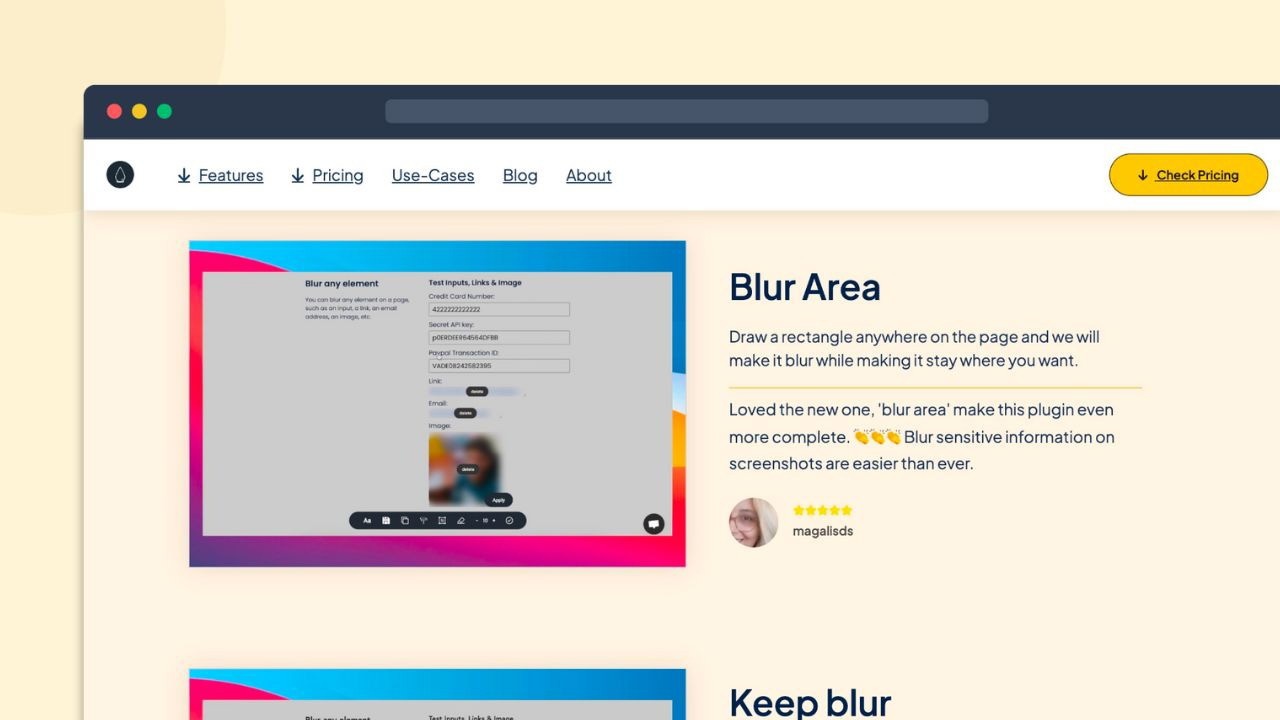
Another notable tool is the Blur Area feature, which lets you select and blur specific areas on a webpage. This ensures that only the necessary information is visible, while sensitive details remain hidden.
The Keep Blur feature maintains the blur effect even after reloading the page. This is especially useful for ongoing projects where you need consistent blurring across multiple sessions.
Customizable Blurring Options
Blurweb App provides customizable blurring options to suit various needs. You can blur different types of content, whether it’s text, images, or specific sections of a webpage.
The app is also GDPR-compliant, ensuring that your data privacy is maintained while using its features. This is crucial for users who handle sensitive information regularly.
Additionally, the app integrates seamlessly with popular video conferencing tools like Google Meet, Loom, Microsoft Teams, and Zoom. This makes it a versatile tool for professionals who use multiple platforms.
User-friendly Interface
The Blurweb App boasts a user-friendly interface that makes it easy for anyone to use. Its single click blur functionality simplifies the process, allowing you to focus on your content rather than technical details.
The app’s ease of use significantly reduces the need for post-production editing. This saves you time and effort, making your workflow more efficient.
With its straightforward design, even non-tech-savvy users can quickly learn to use the app. This ensures that everyone in your team can benefit from its features without a steep learning curve.
In summary, the Blurweb App is a valuable tool for anyone who needs to share their screen while keeping sensitive information secure. Its advanced blurring tools, customizable options, and user-friendly interface make it an essential addition to your digital toolkit.
How Blurweb App Enhances Privacy
The Blurweb App is a powerful browser extension designed to ensure privacy during video recordings and screen sharing. By allowing users to instantly blur sensitive information, it eliminates the need for post-production edits and enhances security. Here’s how the Blurweb App can help maintain your privacy.
Protecting Sensitive Information
With the Blurweb App, you can instantly blur images, paragraphs, or input fields with a single click. This feature is particularly useful for video creators and professionals who need to share their screens but want to keep confidential data hidden.
- Blur images, text, and input fields
- Eliminate the need for post-production edits
- Ensure sensitive information remains private
Preventing Unauthorized Access
The app offers a Keep Blur feature that maintains the blur effect even after reloading the page. This ensures that sensitive information remains protected throughout your browsing session.
- Keep sensitive data blurred even after page reload
- Compatible with Google Meet, Loom, Microsoft Teams, and Zoom
- GDPR-compliant, ensuring data privacy
Maintaining Data Confidentiality
The Blurweb App’s Blur Area feature allows users to select and blur specific areas on a webpage. This helps maintain data confidentiality during live sessions or recordings, ensuring that only the intended information is visible.
- Select and blur specific areas on a webpage
- Enhance privacy during live sessions and recordings
- Reduce the risk of accidental data exposure
By using the Blurweb App, you can ensure that your sensitive information stays protected, and your privacy remains intact during screen sharing and video recordings.
Credit: appsumo.com
Pricing And Affordability
Blurweb App offers practical and secure features for video creators. Pricing is structured to be both affordable and flexible, ensuring users get the best value for their investment.
Subscription Plans
Blurweb App provides three subscription plans, each designed to suit different needs and budgets. All plans are one-time payments, offering lifetime access without recurring fees. Here are the details:
| Plan | Devices/Browsers | Price | Regular Price |
|---|---|---|---|
| Plan 1 | 3 | $17 | $28 |
| Plan 2 | 6 | $34 | $56 |
| Plan 3 | 9 | $51 | $84 |
Free Vs. Premium Features
Blurweb App does not offer a free version, but the premium features justify the cost. Users gain access to:
- Single Click Blur: Instantly blur images, paragraphs, or input fields.
- Blur Area: Select and blur specific areas on a webpage.
- Keep Blur: Maintain the blur effect even after reloading the page.
- Integrations: Compatible with Google Meet, Loom, Microsoft Teams, and Zoom.
- GDPR-compliant: Ensures data privacy.
These premium features ensure that sensitive information remains hidden during recordings and live sessions.
Value For Money
Blurweb App provides excellent value for money. The one-time payment structure means you pay once and enjoy lifetime access. This eliminates ongoing costs and provides long-term savings.
With the 60-day money-back guarantee, users can try the app risk-free. This ensures satisfaction and builds trust in the product’s quality. The tool’s efficiency and security make it a smart investment for video creators, customer support teams, and YouTubers.
Pros And Cons Of Blurweb App
The Blurweb App is a useful tool for video creators and screen sharers. It allows users to blur sensitive data instantly, ensuring secure and efficient screen sharing. Here, we’ll explore the advantages and areas for improvement of this browser extension.
Advantages Of Using Blurweb App
- Single Click Blur: Instantly blur images, paragraphs, or input fields with a single click.
- Blur Area: Select and blur specific areas on a webpage to hide sensitive information.
- Keep Blur: Maintain the blur effect even after reloading the page, ensuring continuous protection.
- Integrations: Compatible with popular tools like Google Meet, Loom, Microsoft Teams, and Zoom.
- GDPR-compliant: Ensures data privacy and compliance with regulations.
The Blurweb App offers several benefits, including:
- Security: Prevents accidental data exposure during screen sharing.
- Efficiency: Reduces the need for post-production editing.
- Ease of Use: Simple click-to-blur functionality makes it user-friendly.
- Versatility: Works seamlessly with various video conferencing tools and browsers.
Areas For Improvement
While the Blurweb App has many advantages, there are a few areas where it could improve:
- Limited Browser Compatibility: The extension may not work on all browsers, limiting its usability.
- Advanced Features: Some users might look for more advanced features beyond basic blurring.
- Customization Options: Additional customization options could enhance user experience.
| Pricing Plans | Cost | Devices/Browsers |
|---|---|---|
| Plan 1 | $17 (regular price $28) | 3 devices/browsers |
| Plan 2 | $34 (regular price $56) | 6 devices/browsers |
| Plan 3 | $51 (regular price $84) | 9 devices/browsers |
The Blurweb App comes with a 60-day money-back guarantee. Users can try the app for 2 months and ensure it meets their needs.
The Blurweb App is a valuable tool for content creators, customer support teams, and YouTubers. It provides an efficient and secure solution for hiding sensitive information during recordings and live sessions.

Credit: www.linkedin.com
Ideal Users And Scenarios
The Blurweb App is a versatile tool designed to secure sensitive information during live sessions and recordings. It offers a range of features that cater to various professionals and scenarios. Let’s explore who can benefit the most and the best use cases for this app.
Who Can Benefit The Most
The Blurweb App is ideal for the following users:
- Video Creators: Those who create instructional or tutorial videos and need to protect personal information displayed on their screen.
- Customer Support Teams: Representatives who share screens with customers to resolve issues without exposing confidential data.
- Educators: Teachers and trainers conducting online classes who need to hide student information or other sensitive details.
- Remote Workers: Professionals participating in virtual meetings who must ensure no sensitive information is visible.
- Freelancers: Independent contractors who need to share their screens with clients while safeguarding private information.
Best Use Cases For Blurweb App
The Blurweb App shines in several scenarios, making it an indispensable tool for many professionals.
| Scenario | Description |
|---|---|
| Live Screen Sharing | Use the app during live sessions on platforms like Google Meet, Microsoft Teams, and Zoom to instantly blur sensitive data. |
| Video Recordings | When creating videos on Loom or similar tools, blur specific areas to prevent post-production edits. |
| Online Classes | Teachers can blur student names or grades displayed on their screen during virtual lessons. |
| Client Presentations | Freelancers and remote workers can share project progress without exposing confidential client data. |
| Technical Support | Customer support teams can screen share while ensuring no personal customer information is visible. |
The Blurweb App offers a simple click-to-blur functionality, ensuring ease of use and efficiency. Its compatibility with various browsers and video conferencing tools makes it a versatile choice for many professionals. With a one-time payment plan and a 60-day money-back guarantee, it is a cost-effective solution for enhancing privacy and security during screen sharing.
Frequently Asked Questions
What Is Blurweb App?
Blurweb App is a tool that helps users blur sensitive information on web pages. It ensures privacy and data protection.
How Does Blurweb App Work?
Blurweb App allows users to blur specific sections of a web page. It is user-friendly and simple to use.
Can Blurweb App Blur Text?
Yes, Blurweb App can blur text on any web page. It is ideal for hiding sensitive information.
Is Blurweb App Safe To Use?
Yes, Blurweb App is safe to use. It is designed to protect user data and privacy online.
Conclusion
Blurweb App simplifies hiding sensitive data during screen sharing. Its one-click blur feature saves time and ensures privacy. Compatible with major video tools, it offers great utility. Affordable pricing and a 60-day money-back guarantee make it worth considering. Enhance your screen sharing experience with Blurweb App. Discover Blurweb App today.
