

In today’s digital age, managing countless bookmarks can be overwhelming. Enter minimarks, a compact bookmark manager and start page designed to streamline your digital life.
This review will explore how minimarks can help you organize, share, and publish your favorite links with ease. Minimarks is more than just a simple bookmark manager. It offers a powerful search bar, customizable themes, and seamless syncing across devices. Whether you’re a web enthusiast or part of a team, minimarks enhances productivity by making link sharing and collaboration effortless. Imagine having all your bookmarks neatly organized on one page, accessible from any device. Plus, with features like reading lists and icon grids, you can view your bookmarks in the way that suits you best. Ready to simplify your bookmarking? Discover more about minimarks here.
Introduction To Minimarks
In today’s digital age, managing bookmarks efficiently is crucial. Enter Minimarks, a compact bookmark manager and start page designed for teams and web enthusiasts. This tool allows users to collect, share, and organize their favorite links effortlessly.
What Is Minimarks?
Minimarks is a versatile bookmark manager. It combines simplicity with powerful features, making it an ideal choice for anyone looking to streamline their online experience. Users can manage bookmarks in a streamlined interface, find sites quickly using a powerful search bar, and sync bookmarks across all devices.
Purpose And Benefits Of Using Minimarks
The primary purpose of Minimarks is to enhance productivity and collaboration. It allows users to share entire bookmark collections with team members or anyone via email and publish these collections effortlessly. This makes it an excellent tool for teams and web enthusiasts.
| Features | Benefits |
|---|---|
| Compact Bookmark Manager | Organize and manage bookmarks in a streamlined interface |
| Powerful Search Bar | Find and open sites quickly from your keyboard |
| Share Collections | Effortlessly share bookmark collections with team members |
| Publish Bookmarks | Share bookmark collections on social media |
| Customization | Personalize your start page with different themes |
| Reading Lists and Icon Grids | Display bookmarks in various formats |
| Sync Across Devices | Keep bookmarks in sync across all browsers and devices |
| Team Collaboration | Add comments and chat with your team within the app |
Using Minimarks offers several benefits:
- Enhanced Productivity: Streamline access to frequently used links and tools.
- Seamless Collaboration: Share and edit bookmark collections without emails or texts.
- Cross-Platform Accessibility: Works on all browsers and devices, eliminating compatibility issues.
- Customizable UI: Personalize your start page to suit your style and preferences.
- Easy Bookmark Management: See all bookmarks on one page without the need for folders or tabs.

Credit: topsaashub.com
Key Features Of Minimarks
Minimarks is a compact bookmark manager designed for teams and web enthusiasts. It offers a range of features that help users organize, share, and manage their favorite links with ease. Here are the key features that make Minimarks stand out:
Intuitive User Interface
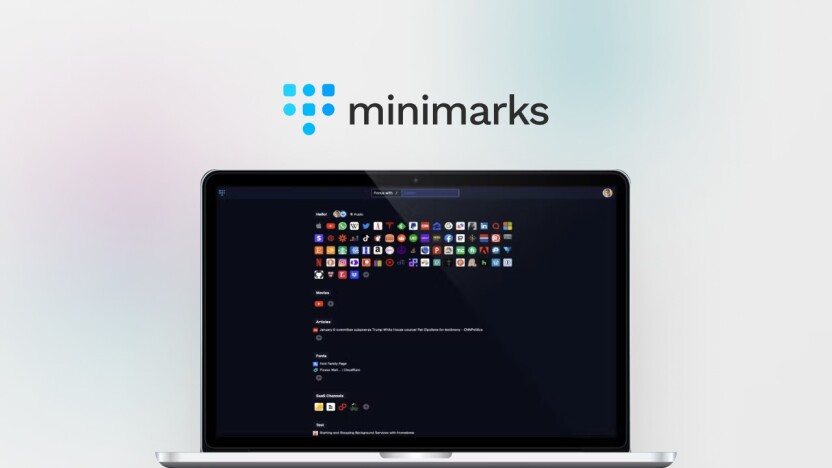
Minimarks boasts an intuitive user interface that makes organizing bookmarks effortless. The streamlined layout ensures users can quickly access and manage their links without any hassle. The customization options allow users to personalize their start page, making the experience both functional and visually appealing.
Advanced Bookmark Organization
With Minimarks, users can enjoy advanced bookmark organization features. The app supports reading lists and icon grids, enabling users to display their bookmarks in a way that suits their preferences. The powerful search bar allows users to find and open sites directly from their keyboard, enhancing productivity.
Cross-device Syncing
One of the standout features of Minimarks is its cross-device syncing capability. Users can keep their bookmarks in sync across all browsers and devices, ensuring they have access to their favorite links no matter where they are. This eliminates compatibility issues and provides a seamless experience.
Collaborative Sharing Options
Minimarks is designed with collaborative sharing options in mind. Users can share entire bookmark collections with team members or anyone via email. The app also allows users to publish their bookmark collections and share the link on social media. Team collaboration is further enhanced with the ability to add comments and chat within the app.
Enhanced Privacy And Security
Minimarks places a strong emphasis on enhanced privacy and security. Users can manage their bookmarks knowing that their data is secure. The app ensures that all bookmarks are protected, providing peace of mind to users who prioritize their online privacy.
Pricing And Affordability
Understanding the pricing and affordability of minimarks is crucial for teams and web enthusiasts. This section delves into the various subscription plans, the differences between free and paid features, and an overall value for money analysis.
Subscription Plans
minimarks offers a simple and straightforward pricing model. The key plan available is:
| Plan | Details | Price |
|---|---|---|
| Lifetime Deal | Includes lifetime access to minimarks Pro Plan with all future updates, 10 team members, and 5 spaces per team member | $49 (originally $432) |
You can also stack an additional code for expanding team member capacity:
- Additional code: 25 team members and 10 spaces per team member
Free Vs. Paid Features
minimarks ensures that users get the most out of their experience. Here’s a look at what you get with the free version versus the paid Pro Plan:
| Feature | Free | Paid |
|---|---|---|
| Compact Bookmark Manager | Yes | Yes |
| Powerful Search Bar | Yes | Yes |
| Share Collections | Yes | Yes |
| Publish Bookmarks | No | Yes |
| Customization | Limited | Yes |
| Reading Lists and Icon Grids | No | Yes |
| Sync Across Devices | No | Yes |
| Team Collaboration | No | Yes |
Value For Money Analysis
minimarks provides excellent value for its price. The lifetime deal at $49 is a one-time payment, which is significantly cheaper than many subscription-based services. This includes all future updates, making it a cost-effective option.
The Pro Plan offers numerous features that enhance productivity and collaboration. From sharing collections to customization options and team collaboration tools, the value received far exceeds the cost.
Considering the comprehensive features and the 60-day money-back guarantee, minimarks stands out as an affordable yet powerful bookmark manager. It supports teams and web enthusiasts in their daily tasks seamlessly.
Credit: appsumo.com
Pros And Cons Of Minimarks
Minimarks is a compact bookmark manager and start page designed for teams and web enthusiasts. It offers a range of features for organizing, sharing, and managing bookmarks. Let’s explore the pros and cons to help you decide if it’s the right tool for you.
Advantages Of Using Minimarks
- Compact Bookmark Manager: Minimarks provides a streamlined interface to easily manage bookmarks.
- Powerful Search Bar: Quickly find and open sites directly from your keyboard.
- Share Collections: Effortlessly share entire bookmark collections with team members via email.
- Publish Bookmarks: Publish and share bookmark collections on social media.
- Customization: Choose different themes and personalize your start page.
- Reading Lists and Icon Grids: Display bookmarks as reading lists or icon grids.
- Sync Across Devices: Keep bookmarks synchronized across all browsers and devices.
- Team Collaboration: Add comments and chat with your team within the app.
Limitations And Drawbacks
- Minimarks is a paid service with a one-time payment of $49.
- Some users may find the feature set overwhelming if they only need basic bookmark management.
- Customization options, while useful, might not appeal to users looking for a minimalist approach.
| Feature | Pros | Cons |
|---|---|---|
| Compact Bookmark Manager | Streamlined interface for easy management | Paid service |
| Powerful Search Bar | Quickly find and open sites | Overwhelming for basic users |
| Share Collections | Effortlessly share collections via email | None |
| Publish Bookmarks | Share collections on social media | Customization might not appeal to minimalists |
| Customization | Choose themes and personalize start page | None |
| Reading Lists and Icon Grids | Display bookmarks as lists or grids | None |
| Sync Across Devices | Keep bookmarks synchronized | None |
| Team Collaboration | Add comments and chat with team | None |
Ideal Users And Scenarios
Minimarks is a compact bookmark manager and start page designed for teams and web enthusiasts. It is crafted to help users effortlessly collect, share, and organize their favorite links.
Who Will Benefit Most From Minimarks?
Minimarks is ideal for various user groups:
- Teams who need to share bookmarks and collaborate on projects.
- Web Enthusiasts who collect and organize numerous links.
- Individuals looking for a streamlined way to manage bookmarks.
- Students who need to organize research links.
- Professionals who want to enhance productivity by quick access to frequently used links.
Best Use Cases For Minimarks
There are several scenarios where Minimarks shines:
- Team Collaboration: Share and edit bookmark collections with team members. Add comments and chat within the app.
- Organizing Research: Collect and manage research links in one place. Display them as reading lists or icon grids.
- Project Management: Keep project-related links organized and easily accessible. Share collections with team members via email.
- Personal Use: Sync bookmarks across devices and browsers. Customize the start page to suit your style.
- Publishing Bookmarks: Effortlessly publish bookmark collections and share the link on social media.

Credit: www.youtube.com
Frequently Asked Questions
What Is Minimarks?
Minimarks is a bookmark manager and start page app. It helps organize and access your favorite websites easily. It’s designed to improve your productivity.
How Does Minimarks Work?
Minimarks lets you save and categorize bookmarks. You can access them quickly from a customizable start page. It syncs across devices for convenience.
Is Minimarks Free To Use?
Minimarks offers both free and premium plans. The free plan includes basic features. The premium plan unlocks advanced functionalities and customization options.
Can I Customize My Minimarks Page?
Yes, Minimarks allows customization of your start page. You can choose themes, layouts, and organize bookmarks as per your preference.
Conclusion
Minimarks offers a seamless and efficient way to manage bookmarks. Its compact design and powerful features make it a valuable tool for teams and web enthusiasts. Easy sharing and collaboration enhance productivity, while customization options add a personal touch. With cross-platform accessibility, your bookmarks are always within reach. Interested in trying minimarks? Discover more and make your purchase here. Enjoy organized and effortless bookmark management.
