

When managing a WordPress site, redirects are crucial. They help avoid 404 errors and improve SEO.
WP 301 Redirects offers a reliable solution for this. It detects broken links, automates redirects, and enhances user experience. Understanding WP 301 Redirects pricing is essential for any site owner. This plugin not only helps manage links but also provides a centralized dashboard for easy control. With features like Google Safe Browsing integration and GDPR compliance, it ensures your site is both safe and efficient. The lifetime access plan is a great deal, offering significant savings and comprehensive support. Dive into the details to see how WP 301 Redirects can benefit your site and fit your budget. Learn more about WP 301 Redirects

Credit: www.youtube.com
Introduction To Wp 301 Redirects
WP 301 Redirects is a powerful WordPress plugin designed to help manage and automate redirects. It detects broken or dangerous links, optimizing outgoing links to improve SEO and user experience. This tool is essential for any WordPress site owner looking to enhance their website’s performance and user navigation.
Overview Of Wp 301 Redirects
WP 301 Redirects offers a comprehensive solution for handling various redirect needs. Key features include:
- Automatic Redirects: Redirects mistyped URLs to avoid 404 errors.
- Link Scanner Tool: Scans for broken or dangerous links.
- Centralized Dashboard: Manage multiple sites and track click stats from one location.
- Google Safe Browsing Integration: Identifies links to sites with poor reputations or malware.
- Manual Redirects: Create custom redirect rules.
- Customization: Rebrand the plugin interface without any coding.
- GDPR Compliance: Ensures data protection and privacy.
Purpose And Importance Of Redirects
Redirects play a crucial role in maintaining a website’s SEO and user experience. The primary benefits of using WP 301 Redirects include:
- Improved SEO: Avoid broken links and 404 errors that can harm SEO rankings.
- Enhanced User Experience: Direct visitors to the correct pages, even if they mistype URLs.
- Affiliate Link Management: Conceal long affiliate links and drive more traffic.
- Efficient Site Management: Monitor and control redirects and site performance remotely.
- Professional Reporting: Export branded PDF reports to present to clients.
| Pricing Details | Description |
|---|---|
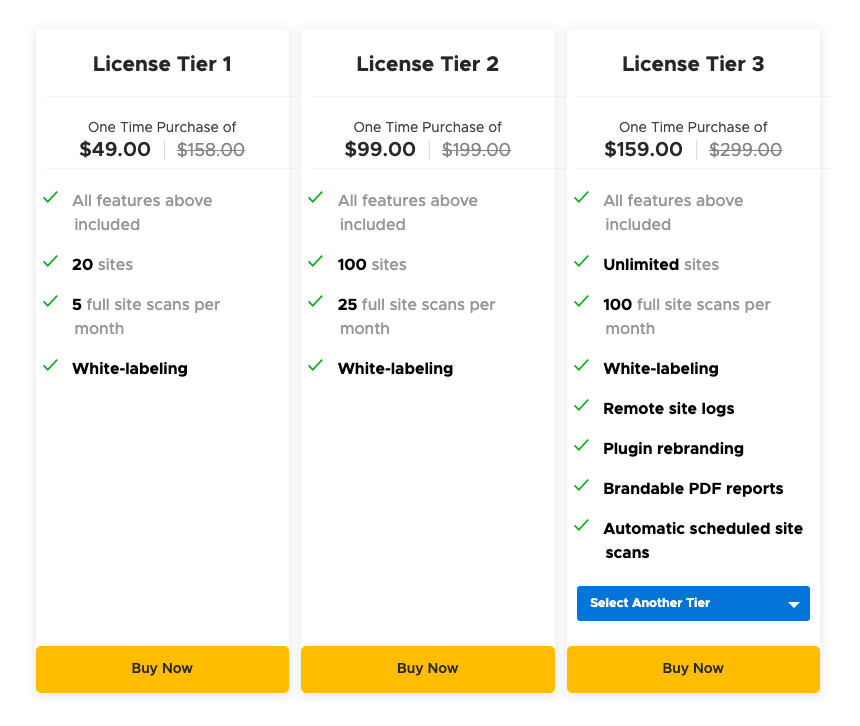
| Lifetime Access | One-time payment of $49 (originally $158, 69% off). |
| License Tier 1 | Supports 20 sites, 5 full site scans per month, includes white labeling and remote site management features. |
WP 301 Redirects also offers a 60-Day Money-Back Guarantee. Try it for 60 days, and if it doesn’t meet your needs, get a full refund. For support, the team is available via email for installation and setup queries.
Credit: kenmoo.me
Key Features Of Wp 301 Redirects
WP 301 Redirects is a powerful WordPress plugin designed to enhance SEO and improve the user experience by managing redirects and fixing broken links. Here are some of its key features:
Easy Setup And User-friendly Interface
Setting up WP 301 Redirects is a breeze. The plugin offers a user-friendly interface that simplifies the process. You don’t need to be a tech expert to get started. With clear navigation and intuitive design, even beginners can easily manage redirects.
The plugin also allows for customization. You can rebrand the interface without any coding knowledge, making it look professional and tailored to your needs.
Comprehensive Redirect Management
WP 301 Redirects excels in redirect management. It offers both automatic and manual redirects. Automatic redirects handle mistyped URLs to prevent 404 errors, while manual redirects let you create custom rules.
Additionally, the link scanner tool scans for broken or dangerous links, ensuring your site remains safe and reliable.
Analytics And Performance Tracking
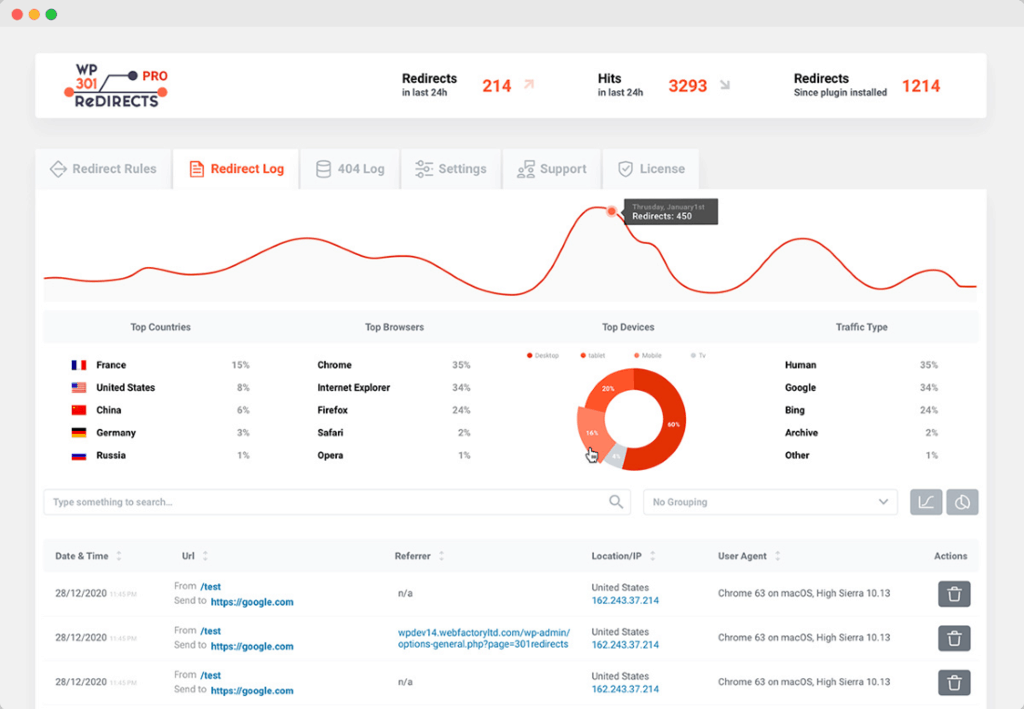
Stay informed with robust analytics and performance tracking features. The centralized dashboard lets you manage multiple sites and track click stats from one location. This helps you monitor and improve your site’s performance.
Export branded PDF reports to showcase your efforts and results, adding a professional touch to your site management.
Compatibility With Seo Plugins
WP 301 Redirects is fully compatible with other SEO plugins. This ensures that your SEO efforts are not hindered. The integration with Google Safe Browsing adds an extra layer of security by detecting links to sites with poor reputations or malware.
By avoiding broken links and 404 errors, the plugin boosts your site’s SEO rankings and enhances the user experience.
For more information, visit the official WP 301 Redirects page.
Pricing And Affordability Breakdown
WP 301 Redirects offers a comprehensive solution for managing redirects and improving SEO. Understanding the pricing and affordability of this plugin helps you make an informed decision.
Overview Of Pricing Tiers
WP 301 Redirects provides lifetime access at a one-time payment. Below are the details of the pricing tier:
| Plan | Price | Features |
|---|---|---|
| License Tier 1 | $49 |
|
Cost-benefit Analysis
Paying $49 for lifetime access provides significant value for those managing multiple sites. Here are the key benefits:
- Improved SEO: Avoid broken links and 404 errors.
- Enhanced User Experience: Redirect visitors correctly even with mistyped URLs.
- Affiliate Link Management: Manage and hide long links.
- Efficient Site Management: Monitor and control redirects remotely.
- Professional Reporting: Export branded PDF reports.
Considering these features, the investment in WP 301 Redirects is highly beneficial for long-term site management.
Comparison With Competitors
When compared with other plugins in the market, WP 301 Redirects stands out due to its lifetime access and extensive features. Here’s a brief comparison:
| Feature | WP 301 Redirects | Competitor A | Competitor B |
|---|---|---|---|
| Lifetime Access | Yes | No | No |
| Automatic Redirects | Yes | Yes | Yes |
| Link Scanner Tool | Yes | Limited | No |
| Centralized Dashboard | Yes | No | No |
| GDPR Compliance | Yes | Yes | Yes |
WP 301 Redirects offers a comprehensive set of features that many competitors lack, especially at a one-time cost.
Pros And Cons Of Wp 301 Redirects
WP 301 Redirects is a powerful WordPress plugin designed to manage and automate redirects, detect broken links, and optimize outgoing links. It offers a range of features to improve SEO and enhance user experience. Below, we explore the strengths and benefits as well as the potential drawbacks and limitations of using WP 301 Redirects.
Strengths And Benefits
- Automatic Redirects: The plugin automatically redirects mistyped URLs, avoiding 404 errors.
- Improved SEO: By preventing broken links, it helps maintain better SEO rankings.
- Enhanced User Experience: Visitors are directed to the correct pages even if URLs are mistyped.
- Link Scanner Tool: It scans for broken or dangerous links, ensuring site safety.
- Centralized Dashboard: Manage multiple sites and track click stats from one location.
- Google Safe Browsing Integration: Identifies links to sites with poor reputations or malware.
- Manual Redirects: Users can create custom redirect rules to meet specific needs.
- Customization: The plugin interface can be rebranded without any coding.
- GDPR Compliance: Ensures data protection and privacy.
- Affiliate Link Management: Hides long affiliate links and drives more traffic.
- Efficient Site Management: Monitor and control redirects and site performance remotely.
- Professional Reporting: Export branded PDF reports to showcase to clients.
Potential Drawbacks And Limitations
- Initial Cost: The one-time payment of $49 may be high for some users.
- Limited Scans: License Tier 1 supports only 5 full site scans per month.
- Learning Curve: New users might find it challenging to navigate all features initially.
- Integration Limitation: Works only with WordPress and Google Safe Browsing.
| Feature | Benefit | Limitation |
|---|---|---|
| Automatic Redirects | Avoids 404 errors | None |
| Link Scanner Tool | Scans broken links | Limited scans per month |
| Centralized Dashboard | Manage multiple sites | Learning curve for new users |
| Google Safe Browsing | Identifies dangerous links | Integration limitation |
Ideal Users And Scenarios For Wp 301 Redirects
WP 301 Redirects is a robust WordPress plugin designed for managing and automating redirects. It helps in detecting broken or dangerous links and optimizing outgoing links to improve SEO and user experience. This tool is ideal for various users and scenarios. Let’s explore its best use cases and target audience.
Best Use Cases
- Website Owners: Ensure all links are active and functional, avoiding 404 errors that can harm SEO.
- SEO Professionals: Redirect mistyped URLs and manage broken links to maintain high search engine rankings.
- Affiliate Marketers: Manage and hide long affiliate links, driving more traffic and increasing conversions.
- Agencies: Monitor and control redirects for multiple client sites from a centralized dashboard.
Target Audience And Their Needs
WP 301 Redirects caters to a diverse audience with distinct needs. Understanding these helps in leveraging the plugin effectively.
| Audience | Needs |
|---|---|
| Website Owners | Maintain a seamless user experience and avoid SEO penalties due to broken links. |
| SEO Professionals | Ensure search engine rankings by managing redirects and avoiding 404 errors. |
| Affiliate Marketers | Optimize affiliate links and improve traffic management. |
| Agencies | Efficiently manage multiple sites and track performance with professional reporting. |
WP 301 Redirects is a must-have tool for anyone looking to enhance SEO and user experience. Its features cater to the needs of various professionals, making it a versatile addition to any WordPress site.
Conclusion: Is Wp 301 Redirects Worth The Investment?
After evaluating the features and benefits of WP 301 Redirects, it’s time to determine if it is worth the investment. This WordPress plugin offers a range of tools designed to improve both SEO and user experience on your website.
Summary Of Key Points
- Automatic Redirects: Fixes mistyped URLs, preventing 404 errors.
- Link Scanner Tool: Detects broken or dangerous links.
- Centralized Dashboard: Manages multiple sites and tracks click statistics from one location.
- Google Safe Browsing Integration: Scans content for links to sites with poor reputations or malware.
- Manual Redirects: Allows creation of custom redirect rules.
- Customization: Rebrands the plugin interface without coding.
- GDPR Compliance: Ensures data protection and privacy.
- Improved SEO: Avoids broken links that hurt SEO rankings.
- Enhanced User Experience: Directs visitors to the correct pages even with mistyped URLs.
- Affiliate Link Management: Hides long affiliate links and drives traffic.
- Efficient Site Management: Monitors and controls redirects remotely.
- Professional Reporting: Exports branded PDF reports.
Final Recommendations
WP 301 Redirects offers significant features at a competitive price. The one-time payment of $49 provides lifetime access and supports up to 20 sites, making it an excellent value for money. The inclusion of all future Team Plan updates ensures that you stay up-to-date with the latest features.
| Feature | Description |
|---|---|
| License Tier 1 | Supports 20 sites with 5 full site scans per month |
| White Labeling | Allows rebranding without coding |
| Remote Site Management | Manage multiple sites from one dashboard |
| GDPR Compliance | Ensures data protection and privacy |
| 60-Day Money-Back Guarantee | Full refund if not satisfied within 60 days |
Given the extensive list of features and benefits, WP 301 Redirects is a valuable investment for anyone looking to improve their website’s SEO and user experience. The centralized dashboard and Google Safe Browsing integration add extra layers of functionality and security.
With the 60-day money-back guarantee, you can try the plugin risk-free. If it doesn’t meet your needs, you can get a full refund. This makes it an attractive option for webmasters and business owners alike.
Frequently Asked Questions
What Is The Cost Of Wp 301 Redirects?
The cost of WP 301 Redirects varies based on different pricing plans. They offer multiple options to fit various needs and budgets.
Are There Any Free Wp 301 Redirects Plans?
WP 301 Redirects does not offer free plans. All their plans are paid, starting from a basic option to more advanced ones.
How Do I Choose The Right Wp 301 Redirects Plan?
To choose the right plan, consider your website’s size, traffic, and specific needs. Evaluate the features offered in each plan.
Does Wp 301 Redirects Offer A Money-back Guarantee?
Yes, WP 301 Redirects offers a money-back guarantee. If you are not satisfied, you can request a refund within the specified period.
Conclusion
Choosing WP 301 Redirects simplifies managing site redirects and broken links. This tool enhances SEO and user experience, ensuring visitors reach the correct pages. With features like automatic redirects, a link scanner tool, and a centralized dashboard, you can efficiently manage multiple sites. The lifetime access plan offers excellent value at $49. Plus, you get a 60-day money-back guarantee. Ready to improve your site’s performance? Explore WP 301 Redirects today.
