

In today’s digital world, creating stunning graphics is essential. Whether you’re a professional designer or a beginner, you need the right tools.
Drawtify offers a powerful, user-friendly online illustrator and vector graphic editor packed with features. Drawtify stands out with its extensive range of design tools and templates. It simplifies the design process with over 1000 templates, 20,000+ icons and shapes, and a variety of special effects. You can create professional designs quickly and effortlessly. From photo editing to animation tools, Drawtify covers all your needs. It’s an affordable alternative to expensive design software, with a one-time purchase giving you lifetime access. Explore Drawtify to see how it can elevate your design projects.
Introduction To Drawtify
Welcome to our comprehensive guide on Drawtify. This user-friendly online illustrator and vector graphic editor aims to simplify the design process. Whether you’re a professional designer or a non-designer, Drawtify provides powerful tools and templates to create stunning graphics quickly and efficiently.
Overview Of Drawtify
Drawtify is an online platform offering a wide range of design tools. It supports both vector-based designs and photo editing. Here are some key features:
- Vector Editor: 100% vector-based design tools
- Templates: Over 1000 design element templates
- Icons and Shapes: Access to 20,000+ icons and shapes
- Photo Editing: Fast and precise photo editing capabilities
- Special Effects: Includes incredible special effects
- Typography & Layout: Artistic typography and layout options
- Animation Tools: Intuitive tools for creating animations
- Barcode Generator: Built-in barcode generator
- Table Editing: Multiple built-in table editing tools
- Unlimited Layers: Unlimited layer list for complex designs
- Design Resources: High-quality editable templates, art texts, infographic elements, barcodes, charts, diagrams, and maps
- Integrations: Integration with Unsplash for additional design resources
Purpose And Target Audience
Drawtify is designed to cater to a broad audience. It aims to make design accessible and easy for everyone. Here’s a breakdown of its target audience:
| Target Audience | Purpose |
|---|---|
| Professional Designers | Create complex and professional designs with unlimited layers and advanced tools. |
| Non-Designers | Use easy-to-use templates and tools to create professional graphics quickly. |
| Content Creators | Produce engaging visual content for blogs, social media, and more. |
| Freelancers | Offer design services with a cost-effective alternative to Adobe Illustrator, Canva, and Visme. |
Drawtify’s affordable pricing model, featuring a one-time purchase of $79.90, provides lifetime access with all future updates. It includes a 60-day money-back guarantee, ensuring satisfaction.
Credit: drawtify.com
Key Features Of Drawtify
Drawtify is an online illustrator and vector graphic editor designed for both professionals and non-designers. It offers a range of powerful tools to create professional-looking graphics quickly. Let’s explore the key features that make Drawtify an excellent choice for your design needs.
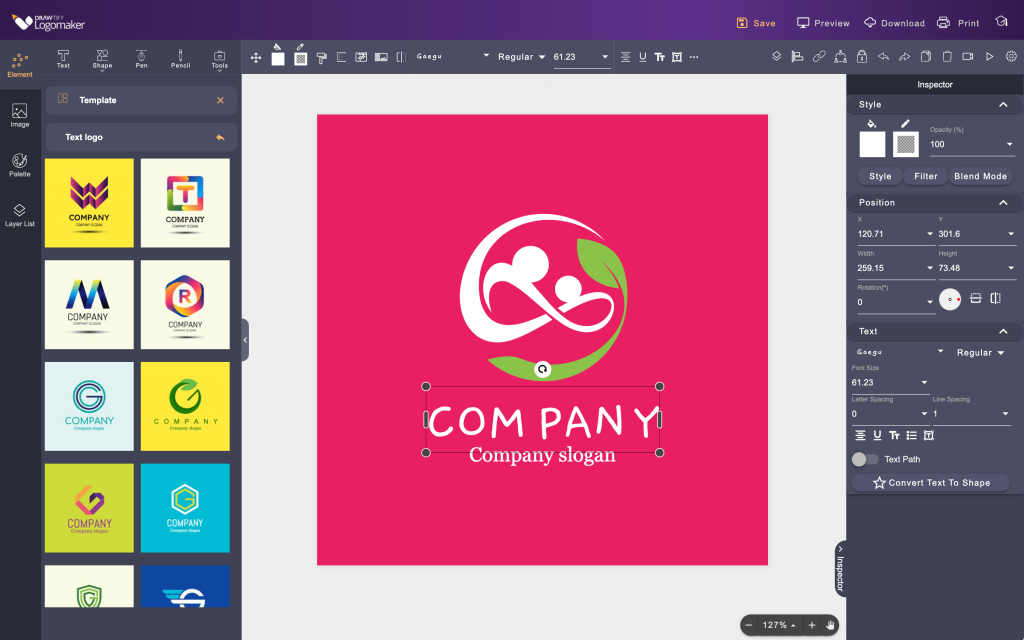
Drawtify boasts an intuitive user interface that simplifies the design process. Even beginners can navigate easily. The layout is clean and user-friendly, ensuring a smooth experience.
With Drawtify, you get access to a comprehensive set of design tools. It includes:
- Vector Editor: 100% vector-based design tools.
- Photo Editing: Fast and precise editing capabilities.
- Special Effects: Add incredible special effects to your designs.
- Typography & Layout: Artistic typography and layout options.
Drawtify offers over 1000 design element templates. These templates are fully customizable, allowing you to create unique designs quickly. Whether you need a logo, flyer, or social media post, you can find a template that fits your needs.
Drawtify is a powerful vector graphic editor. It supports 100% vector-based design tools, ensuring your graphics remain crisp and scalable. This feature is perfect for creating high-quality illustrations and logos.
Create eye-catching animations with Drawtify’s animation tools. These tools are intuitive and easy to use, allowing you to add dynamic elements to your designs. Animation can help your content stand out and engage your audience more effectively.
Drawtify integrates seamlessly with cloud storage. This feature allows you to save your designs online and access them from any device. Collaboration is also easier as you can share your work with team members effortlessly.
| Feature | Description |
|---|---|
| Vector Editor | 100% vector-based design tools. |
| Templates | Over 1000 customizable design element templates. |
| Icons and Shapes | Access to 20,000+ icons and shapes. |
| Photo Editing | Fast and precise photo editing capabilities. |
| Special Effects | Includes incredible special effects. |
| Typography & Layout | Artistic typography and layout options. |
| Animation Tools | Intuitive tools for creating animations. |
| Barcode Generator | Built-in barcode generator. |
| Table Editing | Multiple built-in table editing tools. |
| Unlimited Layers | Unlimited layer list for complex designs. |
| Design Resources | High-quality editable templates, art texts, infographic elements, barcodes, charts, diagrams, and maps. |
| Integrations | Integration with Unsplash for additional design resources. |
Intuitive User Interface
Drawtify’s Intuitive User Interface ensures that users can effortlessly create stunning designs. Whether you are a beginner or a professional, Drawtify’s interface is designed to cater to your needs.
Ease Of Use For Beginners
Beginners will find Drawtify incredibly easy to use. The interface is clean and straightforward. Key features include:
- Templates: Access over 1000 design element templates.
- Icons and Shapes: Use 20,000+ icons and shapes.
- Photo Editing: Perform quick and precise edits.
The drag-and-drop functionality simplifies the design process. Even without prior design experience, users can create professional graphics in minutes. The interface guides you every step of the way, making design accessible to everyone.
Efficient Workflow For Professionals
Drawtify offers an efficient workflow for professionals. Advanced features include:
- Vector Editor: Utilize 100% vector-based design tools.
- Unlimited Layers: Manage complex designs with ease.
- Special Effects: Enhance your designs with incredible effects.
Professionals will appreciate the high level of customization available. The integration with Unsplash provides additional design resources, making it easier to find the perfect elements for your project. The built-in barcode generator and table editing tools add to the efficiency, making Drawtify a comprehensive tool for any design task.
Comprehensive Design Tools
Drawtify is packed with powerful design tools. These tools make it easy for both professionals and beginners to create stunning graphics. Explore the comprehensive design tools that set Drawtify apart.
Wide Range Of Design Elements
Drawtify offers a wide range of design elements. With over 20,000+ icons and shapes, users have endless possibilities. These elements help in making each design unique and engaging.
The platform also includes more than 1000 design element templates. These templates simplify the design process. Users can easily customize templates to fit their specific needs.
Advanced Editing Options
Drawtify’s advanced editing options are designed to give users full control. The vector editor is 100% vector-based, ensuring high-quality outputs. Users can scale designs without losing quality.
The photo editing capabilities are fast and precise. This allows users to make quick adjustments to their images. Special effects add an extra layer of creativity to any project.
Typography and layout options are artistic and versatile. Users can experiment with different fonts and layouts to enhance their designs. The platform also includes a barcode generator and multiple table editing tools for added functionality.
With unlimited layers, complex designs are easier to manage. This feature is particularly useful for intricate projects. The integration with Unsplash provides additional design resources, making it easy to find high-quality images.
Overall, Drawtify’s comprehensive design tools make it a powerful choice. Whether you are a freelancer, content creator, or graphic designer, Drawtify has the tools you need to create professional designs efficiently.
Customizable Templates
Drawtify offers a wide range of customizable templates that cater to various design needs. Whether you’re a professional designer or a beginner, these templates can save you time and enhance your creativity.
Time-saving Template Options
Drawtify provides over 1000 design element templates. These templates cover a variety of design categories, making it easy to find what you need quickly.
- Business Cards: Create professional business cards effortlessly.
- Flyers: Design eye-catching flyers for events or promotions.
- Social Media Graphics: Enhance your social media presence with stunning visuals.
- Brochures: Craft informative and visually appealing brochures.
- Posters: Make impactful posters for advertising and announcements.
These templates are designed to be user-friendly, ensuring even beginners can create impressive designs in minutes.
Versatility For Various Projects
Drawtify’s templates are versatile and suitable for numerous projects. They cater to both personal and professional needs.
| Project Type | Template Examples |
|---|---|
| Marketing | Social media ads, email headers, promotional banners |
| Education | Infographics, presentation slides, educational posters |
| Personal | Invitations, greeting cards, photo collages |
| Corporate | Reports, business proposals, company profiles |
Each template can be customized to fit your specific requirements, offering flexibility and creative freedom.
With Drawtify, you can create professional designs for any project without hassle.
Vector Graphics Support
Drawtify stands out with its robust vector graphics support. This feature empowers users to create high-quality graphics and ensures scalability without any loss in quality. Whether you’re a professional designer or a novice, Drawtify provides the tools you need to produce stunning visuals.
High-quality Graphic Creation
With Drawtify, users can create high-quality graphics using its 100% vector-based design tools. These tools allow for precise and detailed graphic creation, ensuring each element is sharp and clear. The platform offers:
- Over 1000 design element templates
- Access to 20,000+ icons and shapes
- Incredible special effects
- Artistic typography and layout options
This comprehensive suite of tools ensures that even complex designs are manageable and professional-looking. Users can experiment with different elements and effects to produce unique and captivating graphics.
Scalability Without Quality Loss
One of the most significant advantages of Drawtify’s vector graphics support is the ability to scale designs without losing quality. Vector graphics are resolution-independent, meaning they can be resized to any dimension without becoming pixelated or blurry.
This feature is particularly useful for creating graphics that need to be used in various sizes and formats. For example, a logo created in Drawtify can be scaled from a small business card to a large billboard, all while maintaining its clarity and sharpness. This makes Drawtify an excellent choice for branding and marketing materials.
Drawtify’s vector graphics support ensures your designs are always professional and versatile, no matter the size or medium.
Animation Capabilities
Drawtify offers powerful animation tools that enhance your designs. These features enable users to create engaging and dynamic visual content easily. Whether you are a professional designer or a beginner, the animation capabilities within Drawtify can help you bring your ideas to life.
Creating Engaging Animations
Creating animations with Drawtify is straightforward. The software provides intuitive tools that let you animate elements with ease. You can animate text, shapes, icons, and images. The process involves selecting the element, choosing the animation type, and adjusting the settings to your preference.
- Text Animation: Animate text to fade in, zoom, or slide.
- Shape Animation: Add movement to shapes for dynamic designs.
- Icon and Image Animation: Make icons and images pop with various effects.
The animation options are versatile, allowing you to create anything from simple transitions to complex motion graphics. This capability makes your designs more interactive and visually appealing.
Exporting And Sharing Animations
Once your animation is complete, exporting and sharing it is seamless with Drawtify. The platform supports various export formats, ensuring compatibility with different media.
| Export Format | Description |
|---|---|
| GIF | Perfect for web animations and social media posts. |
| MP4 | Ideal for video content and presentations. |
After exporting, you can easily share your animations across different platforms. This feature ensures that your animated content reaches your audience effortlessly.
Drawtify’s animation capabilities are designed to save time and enhance creativity. With its user-friendly interface and powerful tools, creating and sharing engaging animations has never been easier.
Credit: www.inkydeals.com
Cloud Storage Integration
Drawtify offers a seamless cloud storage integration feature. This allows users to store, access, and manage their designs effortlessly. This means your creative projects are always within reach, no matter where you are.
Access Designs Anywhere
With Drawtify’s cloud storage, you can access your designs from any device. Working on a project at the office? No problem. Need to make a quick edit on the go? Easy. All your designs are saved in the cloud, ensuring you can retrieve and work on them anytime, anywhere.
This feature eliminates the need for constant file transfers. No more worrying about losing your work. Your designs are securely stored and easily accessible.
Collaborative Features
Collaboration is key in today’s design world. Drawtify’s cloud storage allows you to share your projects with team members effortlessly. Multiple users can work on the same project, making real-time changes and updates.
- Share designs with a simple link.
- Collaborate in real-time with team members.
- Ensure everyone is on the same page with the latest version.
These collaborative features enhance productivity. They ensure that everyone involved in the project can contribute effectively. Whether you’re working with a team or seeking feedback from a client, Drawtify’s cloud storage makes it simple and efficient.
| Feature | Benefit |
|---|---|
| Access Designs Anywhere | Work on projects from any device |
| Collaborative Features | Share and edit designs in real-time |
Drawtify’s cloud storage integration is designed to make your design process smoother. It ensures that your creative work is always accessible and collaborative.
Pricing And Affordability
Understanding the cost and value of Drawtify is essential for users. This section breaks down the pricing options and evaluates the cost-benefit of choosing Drawtify.
Subscription Plans
Drawtify offers a straightforward pricing model. Users can make a one-time purchase of $79.90. This pricing is a significant discount from the original $990, providing a 92% saving.
This one-time purchase grants lifetime access to Drawtify, including all future updates. There are no recurring fees, making it a budget-friendly option for both professionals and non-designers.
Cost-benefit Analysis
Choosing Drawtify over other design tools offers several advantages:
- Professional designs in minutes.
- Access to 20,000+ icons and shapes.
- Unlimited layers for complex designs.
- High-quality editable templates.
- Integration with Unsplash for additional resources.
When compared to other design tools like Adobe Illustrator, Canva, and Visme, Drawtify stands out as a cost-effective alternative. The one-time purchase model eliminates the need for ongoing subscriptions, making it easier on the budget.
Additionally, Drawtify’s features such as the barcode generator and animation tools add extra value, making it suitable for various design needs. The 60-day money-back guarantee also ensures that users can try the tool risk-free.
In summary, Drawtify’s pricing structure is designed to provide maximum value at a minimal cost, making professional graphic design accessible to all.

Credit: drawtify.com
Pros And Cons Of Drawtify
Drawtify is a user-friendly online illustrator and vector graphic editor. It’s designed to make design easier for both professionals and non-designers. Below, we explore its pros and cons in detail.
Advantages
Drawtify offers many benefits that make it a versatile tool for graphic design:
| Feature | Description |
|---|---|
| Vector Editor | 100% vector-based design tools for precision and scalability. |
| Templates | Over 1000 design element templates for quick and easy design creation. |
| Icons and Shapes | Access to 20,000+ icons and shapes to enhance your designs. |
| Photo Editing | Fast and precise photo editing capabilities. |
| Special Effects | Includes incredible special effects to make your designs stand out. |
| Typography & Layout | Artistic typography and layout options for creative text design. |
| Animation Tools | Intuitive tools for creating animations. |
| Barcode Generator | Built-in barcode generator for added functionality. |
| Table Editing | Multiple built-in table editing tools for data presentation. |
| Unlimited Layers | Unlimited layer list for managing complex designs. |
| Design Resources | High-quality editable templates, art texts, infographic elements, barcodes, charts, diagrams, and maps. |
| Integrations | Integration with Unsplash for additional design resources. |
These features make Drawtify a powerful tool for creating professional designs in minutes. It’s suitable for content creators, freelancers, and graphic designers. It’s also a cost-effective alternative to Adobe Illustrator, Canva, and Visme.
Limitations
Despite its many advantages, Drawtify has some limitations:
- Learning Curve: There might be a learning curve for new users, especially non-designers.
- Internet Dependency: As an online tool, Drawtify requires a stable internet connection.
- Limited Customization: Some users may find the customization options limited compared to other software.
- Non-Stackable Deal: The current deal cannot be stacked with other offers, limiting discount opportunities.
These limitations may affect the user experience, especially for those who need more advanced customization or offline access.
Ideal Users And Scenarios
Drawtify is a versatile tool designed to cater to a wide range of users. Its comprehensive features and user-friendly interface make it an excellent choice for various scenarios. Whether you are a professional designer or a non-designer, Drawtify can simplify your design process. In this section, we will explore the best use cases and identify who will benefit the most from Drawtify.
Best Use Cases
Drawtify’s extensive feature set makes it ideal for several design needs. Here are some of the best use cases:
- Creating Marketing Materials: Design flyers, brochures, and posters with ease using Drawtify’s templates and design elements.
- Social Media Graphics: Quickly create eye-catching graphics for platforms like Instagram, Facebook, and Twitter.
- Logo Design: Utilize the vector editor and vast library of icons and shapes to design professional logos.
- Infographics: Access high-quality infographic elements to create informative and visually appealing infographics.
- Animation: Use the intuitive animation tools to create engaging animated content.
- Photo Editing: Enhance and modify images with fast and precise photo editing capabilities.
Who Will Benefit The Most
Several user groups can benefit greatly from Drawtify. Here are the main beneficiaries:
| User Group | Benefits |
|---|---|
| Professional Designers | Access powerful tools and a vast library of design resources to create complex and professional designs. |
| Freelancers | Benefit from cost-effective design software with no recurring fees, making it perfect for budget-conscious freelancers. |
| Content Creators | Create high-quality graphics and animations for their content quickly and efficiently. |
| Non-Designers | Leverage user-friendly tools and templates to produce professional-looking designs without a steep learning curve. |
| Small Business Owners | Generate marketing materials and social media graphics in-house, saving time and money. |
Drawtify’s flexibility makes it suitable for both experienced designers and those new to design. The platform’s resources and tools ensure that anyone can produce high-quality graphics efficiently.
Frequently Asked Questions
What Is Drawtify?
Drawtify is a user-friendly graphic design tool. It provides various templates and design elements. Perfect for creating stunning visuals.
How To Use Drawtify?
Using Drawtify is simple. Sign up, choose a template, and start editing. Customize with images, text, and effects.
Is Drawtify Free?
Yes, Drawtify offers a free version. It includes essential features and templates. Premium plans provide more advanced tools.
Can I Use Drawtify For Business?
Absolutely, Drawtify is great for business. Create logos, flyers, and social media graphics. Enhance your brand’s visual identity.
Conclusion
Drawtify offers a user-friendly design experience for everyone. With powerful tools and over 1000 templates, creating professional graphics becomes easy. It suits both beginners and experienced designers. No need for recurring fees, just a one-time purchase. Start designing effortlessly today with Drawtify. Enjoy a vast library of resources and lifetime access. Try it risk-free with a 60-day money-back guarantee. Make your design journey smooth and creative.
